BhiCoupons.com

  • Home
  • Reviews
  • Blog
You are here: Home / Archives for Blog

How To Setup Free Cloudflare CDN For Your WordPress?

By Sudhir Bhushan Leave a Comment

How To Setup Free Cloudflare CDN Do you want to reduce your WordPress site’s page load time? Set up a CDN system!

A content delivery network acts as the primary proxy between the visitor of the website and the site. It enables the user to receive static content from the nearest servers if the users stay in distant locations i.e. the website loads faster with less physical distance.

Cloudflare is one of the biggest and most popular CDN networks in the world. It aids in delivering the fastest website experience, which can help boost ranking in SERP.

Apart from caching, the content serves as an optimised version of your web pages. It also provides an extra layer of security and minifies the JS files. Plus, it filters out spam and unwanted traffic before it reaches your server making your site safe.

Why You Need Cloudflare CDN for WordPress?

If you compare Cloudflare CDN with other content delivery systems, it offers the best features for a WordPress website. It is an extensive network of static servers that automatically deliver dynamic content and caches static content.

It provides analytics on all the requests made to a website. It also offers easy SSL certificate installation. What’s more, it offers DDOS attack mitigation and provides a network gateway between different protocols.

Bluehost offers Cloudflare CDN feature with all hosting packages. It is directly built into your account and helps to automatically increase your site’s performance. To learn more about other web hosting features, read this Bluehost review.

Top

A. Setup Free Cloudflare CDN For WordPress

Step 1: Create a Cloudflare account
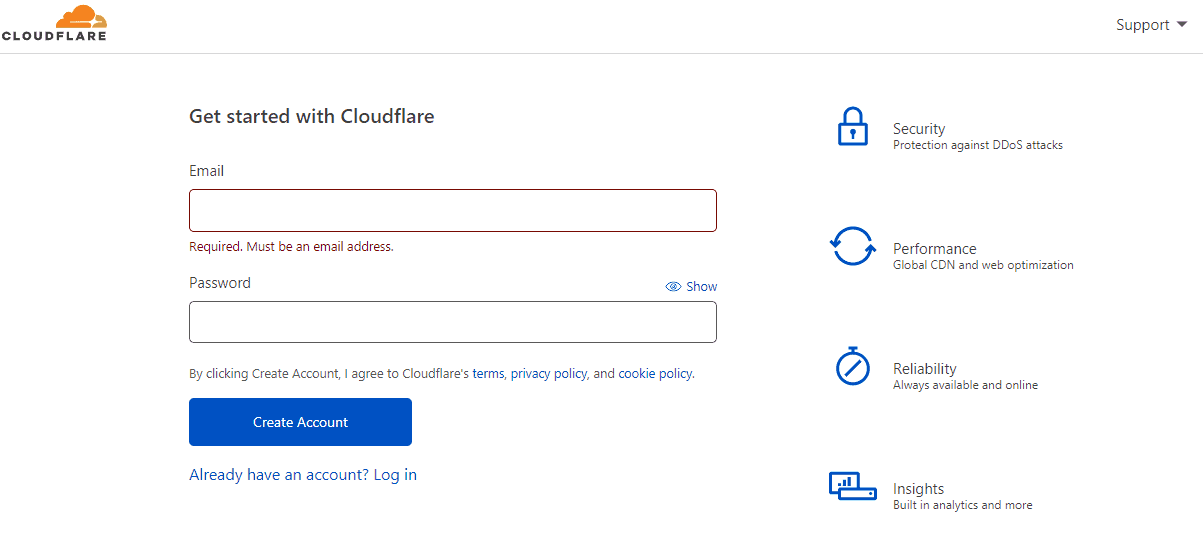
Create a Cloudflare account

Visit CloudFlare to create an account. Click on ‘Sign up’ → enter email → set a strong password with numbers and special characters.

Step 2: Add the domain name

Add the domain name

Once you create an account on Cloudflare, the next step is to add your domain name to the system.

  • Go to the Cloudflare dashboard and select the add site option.
  • You will find the option below the text ‘you currently don’t have any websites.’
  • Here, select a plan. If it is for a personal website, choose a free plan. If it is for a business website, choose a PRO or Business plan.

Step 3: Check the DNS record

Check the DNS record

Once you are through with adding your website to Cloudflare, you will have to provide the DNS details of your website.

  • You can disable or enable Cloudflare with specific sub-domain options. For activation, you will need to toggle the Cloud to orange.
  • Enabling the option is simple for both domain and subdomains. You can press the continue option to proceed to the next step.

If you are doing it from the cPanel, don’t enable the Cloudflare option. It may result in various DNS issues, which will complicate the setup process.

Step 4: Pointing of Domain Name
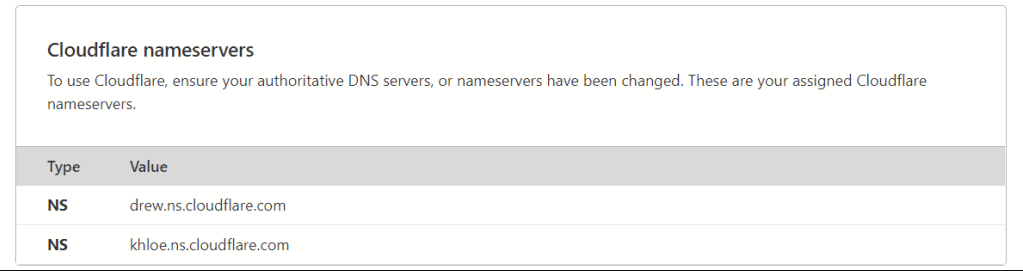
Pointing of Domain Name

After you activate Cloudflare for domain and subdomains, you need to point it to your nameservers.

  • Open the browser tab and visit your control panel. You will be able to find the details of the nameservers there.
  • Here you need to replace the existing nameservers with those of Cloudflare.
  • Once you add all nameservers, click the update option.

Note that the whole process may take some time. At times, it takes about three days to propagate the DNS worldwide.
Once the update is complete, you will receive an email configuration.

You need to check the update status on the website. During the whole process, your page won’t face downtime, which is an advantage.

Step 5: Configuring the Cloudflare Plugin
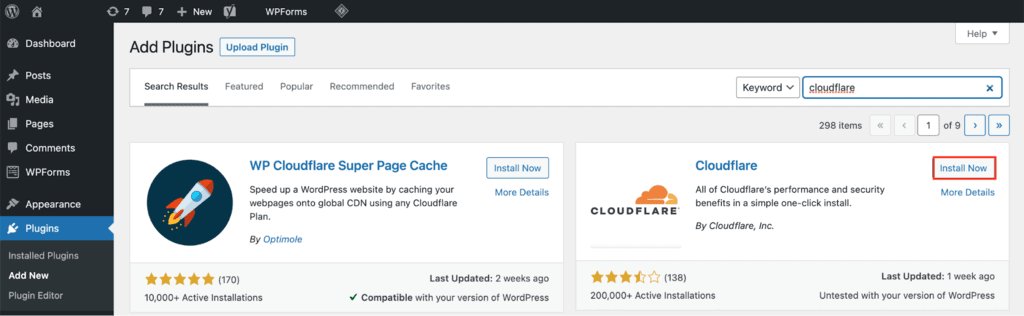
Configuring the Cloudflare Plugin

Once you point to the domain name, it’s time to configure the plugin option. To complete the process, you must install it on WordPress. The tools are available with various features to manage the CDN options.

  • The features include single-click optimization of your WordPress website. It contains an automatic cache purge along with statics and built-in Cloudflare settings for simple modification. It comes with a web application and firewall ruleset.
  • Proceed with the plugin installation. Access the WordPress dashboard → head to plugins → add new. Search for Cloudflare → install and activate the plugin.
  • Go to settings and select Cloudflare. You will need to continue with the API key below the log field options. A window with a Cloudflare account will now be visible, and you will need to go to the API token and select global API. Enter your Cloudflare password and copy the API key.
  • Now go back to the plugin settings and paste the key to login fields. Save the API credentials button to complete the process.

Step 6: After the login process

Once you complete the login process, you will see several settings. To optimise Cloudflare for WordPress, click the apply button to enable the option. It will make sure your Cloudflare settings are ready for the best performance.

  • With the automatic cache management feature, you can clear the Cloudflare cache option every time you edit or switch to a different theme.
  • With the purge cache option, you’ll be able to activate the service after you update your website design or you update your WordPress website.
Top

B. Pros and Cons of Using Cloudflare CDN

Pros

  • Cloudflare CDN is free and helps to improve the performance of the website. It also helps save on the bandwidth.
  • It provides accurate site analytics. The stats are much more reliable than the JavaScript stats.
  • All DNS changes in the website complete in 24 to 48 hours.

Cons

  • It can interfere with the IP address. With the Cloudflare CDN system, the code needs to change the way it passes IP.
Top

On a Final note,

With the CDN system, you’ll be able to create a Cloudflare account and add your domain name to it. You’ll be able to check all the domain records and activate the service. You can point your domain name to the Cloudflare nameservers. Simple installation of WordPress-Cloudflare provides easy configuration.

As always, use Bluehost Coupons to purchase hosting and domain at a hefty discount!
New Domain or Subdomain – Pros and Cons of Each

By Sudhir Bhushan Leave a Comment

New Domain vs Subdomain If you want to create a website, you need to buy a hosting plan and domain. While a domain is a primary name you give your website, a subdomain is an extension (prefix) added to the primary domain which serves as an independent site.

For example, a primary domain can be www.mysite.com, and the subdomain for the same site can be blog.mysite.com. A domain name with www.shopsite.com can have a subdomain like store.shopsite.com.

A new domain means a different website, while a subdomain is a directory that operates independently as the primary domain and can be created easily using the Bluehost cPanel.

By understanding the difference between the subdomain and the new domain, you’ll be able to decide which one best suits your needs. Thus, let’s check out their differences and learn more about their pros and cons.

Which is the best? New Domain or Subdomain?

For those new to the online world, the difference between the primary domain and subdomain can be confusing. While you need to purchase a new domain, on the other hand, a subdomain can be created within the root directory of your website, which will save you money. A subdomain is created to separate different website sections such as blog.mysite.com and is similar to an addon domain. If you’re still confused, then read the article to know more.

Make use of Bluehost domain coupons if you want to register a new domain name.

Top

1. Why Choose a New Domain?

A new domain offers many benefits as the URL can be tailor-made for your business. This can help you improve site visibility on SERPs, thereby driving targeted traffic to your website. The best part about a new domain is; it will help you in ranking your website.

When selecting a new domain, you need to ensure that it is short, simple and relevant to your business. It should be unique as well as memorable. For example, if you want to sell kids clothes online, you can register your domain as www.kidsclothes.com.

Likewise, when it comes to domain extension, .com is more popular than .in, .net or other TLDs. However, owing to its popularity, securing a .com extension with your preferred domain name can be a challenge.

You can also use a Domain name generator tool if you are finding it difficult to come up with a suitable name for your business.

And, once you find a name that is ideal for your business, make use of Bluehost Coupons to register it immediately.

1.1 Pros of the New Domain

  • A new domain offers you a benefit of a white blank page. You’ll be able to design your website and set a tone for branding with a new domain.
  • New names with meaningful URLs make a huge difference in your marketing. It will help your business to gain more visibility.
  • URLs with an exact-match keyword can improve the website’s click-through rate, which will further help your site gain traffic.
  • The number of incoming links to a new domain from any branded site or old site will help boost your SEO.
  • A new domain makes sure that you don’t have to compromise on the spammy or low-quality links.

1.2 Cons of the New Domain

  • Buying a new domain with your preferred extension can be challenging.
  • A new domain won’t have any domain authority, so you would need to work on your site’s SEO all over again.
  • Google will take time to associate with your new domain, so ranking in SERP will be tough.
  • Your website user will be confused if you use the redirection feature on your website.
Top

2. Why Choose a Subdomain?

Choosing a subdomain will give you instant recognition, as subdomains get the benefit of branding as part of the main domain.

When you choose a subdomain, it will help you to rank well in SERP as the main domain already features in Google. If the primary domain site is well-known, the subdomain will also get instant credibility.

Subdomains are an excellent choice if you don’t want to start afresh. However, work needs to be done on the subdomain for the blog and content optimization of web pages.

2.1 Pros of Subdomain

  • With a subdomain, you don’t have to worry about the SEO part. Using associated websites with the same IP and shared ranks will favour your website and influence rankings.
  • Domain age is indeed an essential part of determining the ranking for Google. New domains take years to rank on Google, whereas old ones already have made their way through the ranks.
  • An older domain conveys trust and reliability as compared to a new domain. A primary difference between domain and subdomain is that subdomains don’t have much to offer audience and search engines instantly.
  • When you use a subdomain for a new site, you can soak in the benefits of an old domain or a domain that already exists.
  • Branding and niche authority is maintained with a subdomain, which is good for ranking. You’ll be able to link between various subdomains of the website.
  • Each subdomain will automatically inherit a part of the main domain, that is, the domain authority. This means you won’t have to start from scratch with SEO factors as you do it with a new domain or a website.

2.2 Cons of Subdomain

  • One of the biggest disadvantages of a subdomain is its inability to hold user interest, as navigating between two websites could be tedious.
  • When you use a subdomain, there may be chances of cannibalization of content if other subdomains are on the main site talking about a similar product.
  • A subdomain might create almost duplicate entries for a post, which may affect the indexing and ranking process.
  • It may also create problems filtering data from a reporting perspective. You will need a unique analytics reporting tool for a subdomain which can be a time-consuming process.
  • Subdomains may not be regarded as proper websites in the eyes of search engines, so may take a long time to feature in the ranking process.
Top

To be Brief,

A new domain is a primary site, mostly suited to new websites or start-ups. SEO optimization process in a new domain is a tough call.

Subdomains can be a part of an already existing domain, meaning you don’t have to work on every page. They will rank in Google as apart of your website and most people prefer to add a subdomain to the main page for the extension part.

You will have to choose a new domain or a subdomain based on your primary needs and business requirements. Once done, you can choose web hosting accordingly, and for a discount, use Bluehost Hosting Coupons.

How to Purchase a Domain Name and Hosting With Bluehost?

By Sudhir Bhushan Leave a Comment

How to Purchase a Domain Name and Hosting Purchasing domain name and hosting is an essential step when creating a new website for your business. A reliable web hosting and a memorable domain name have a significant impact on the success of your website.
Bluehost is the most popular web hosting provider that offers different domain extensions along with hosting plans. The different hosting types offered by Bluehost include Shared hosting, VPS hosting, Dedicated hosting and WordPress hosting.

Each domain offered by Bluehost includes easy management for the website interface. It lets you change the DNS records from multiple domains that are available. It offers you an auto-domain renewal option. It also provides a domain lock feature.

Once you purchase a domain that suits your business, you can lock your domain which helps prevent unauthorized transfer. Read this Bluehost review to learn more.

How To Buy Bluehost Domain Name and Hosting?

With Bluehost Coupons, you can get a discount of up to 65% and more on hosting and domain, which makes buying them all the more affordable. Bluehost offers a wide range of hosting types and plans. Likewise, it also offers an array of domain extensions along with other essential addons. If you want to buy Bluehost hosting and domain, then this quick guide can help. This guide provides step-by-step instructions along with screenshots. So, check it out now and purchase hosting and domain in under 5 minutes.

Top

A. Step-by-Step Guide to Purchase Bluehost Hosting and Domain

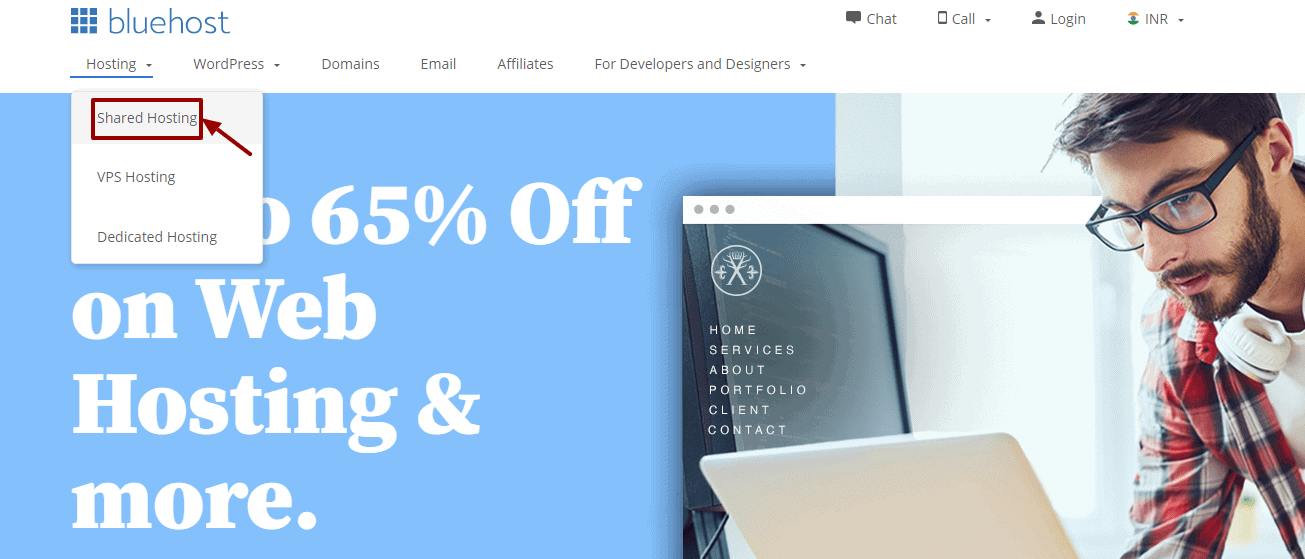
  • Step 1: Go to Bluehost homepage » navigation » Shared hosting.
  • Bluehost Shared Hosting

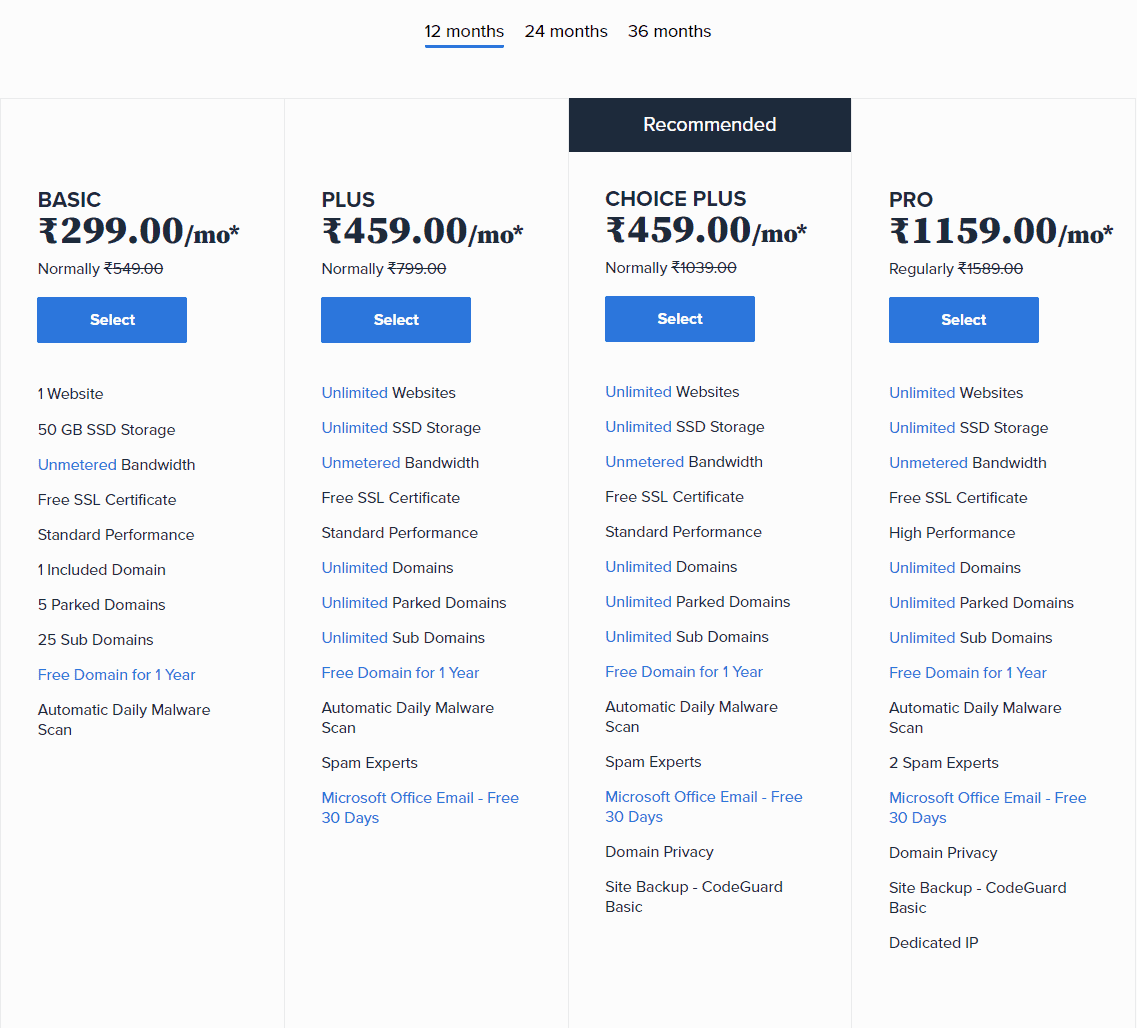
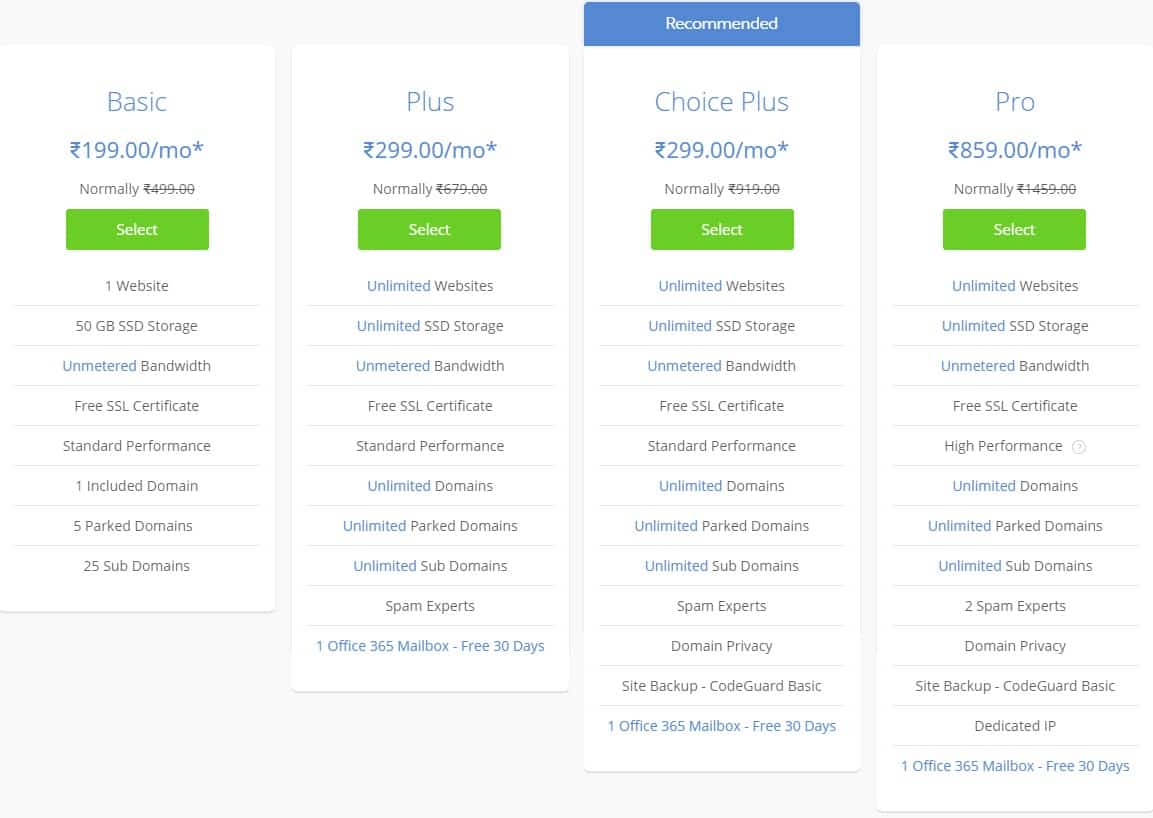
  • Step 2: Choose from the four hosting plan – Basic, Plus, Choice Plus, and Pro. Click on ‘Select’

    Bluehost Hosting Plan

    If you don’t plan to run more than one site, choose the basic Starter plan. It will offer you all the features that are perfect for a start-up website or a blog. You’ll be able to upgrade to an advanced plan in the future if you need it. Use Bluehost Hosting Coupons to make a purchase.

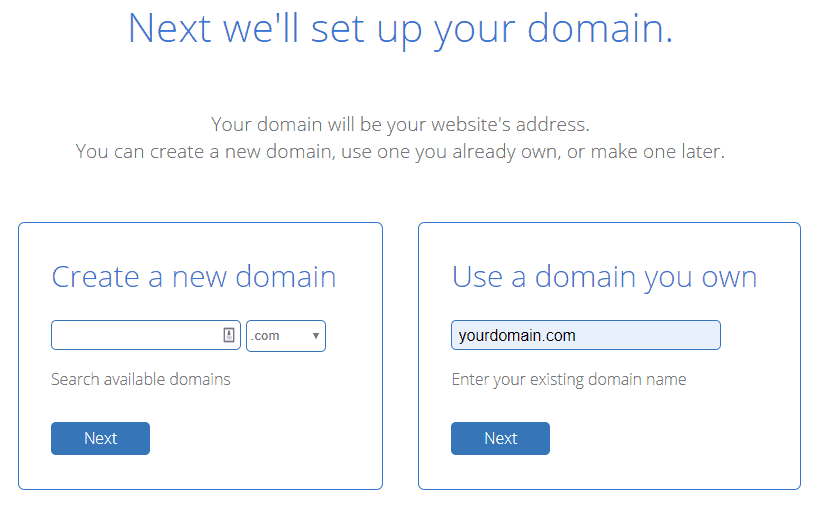
  • Step 3: Create a new domain or enter an existing domain name. Click on ‘Next’

    Bluehost Choose a Domain Name

    Once you add your domain and it’s available, you’ll get the message of congratulations flashing on the screen.

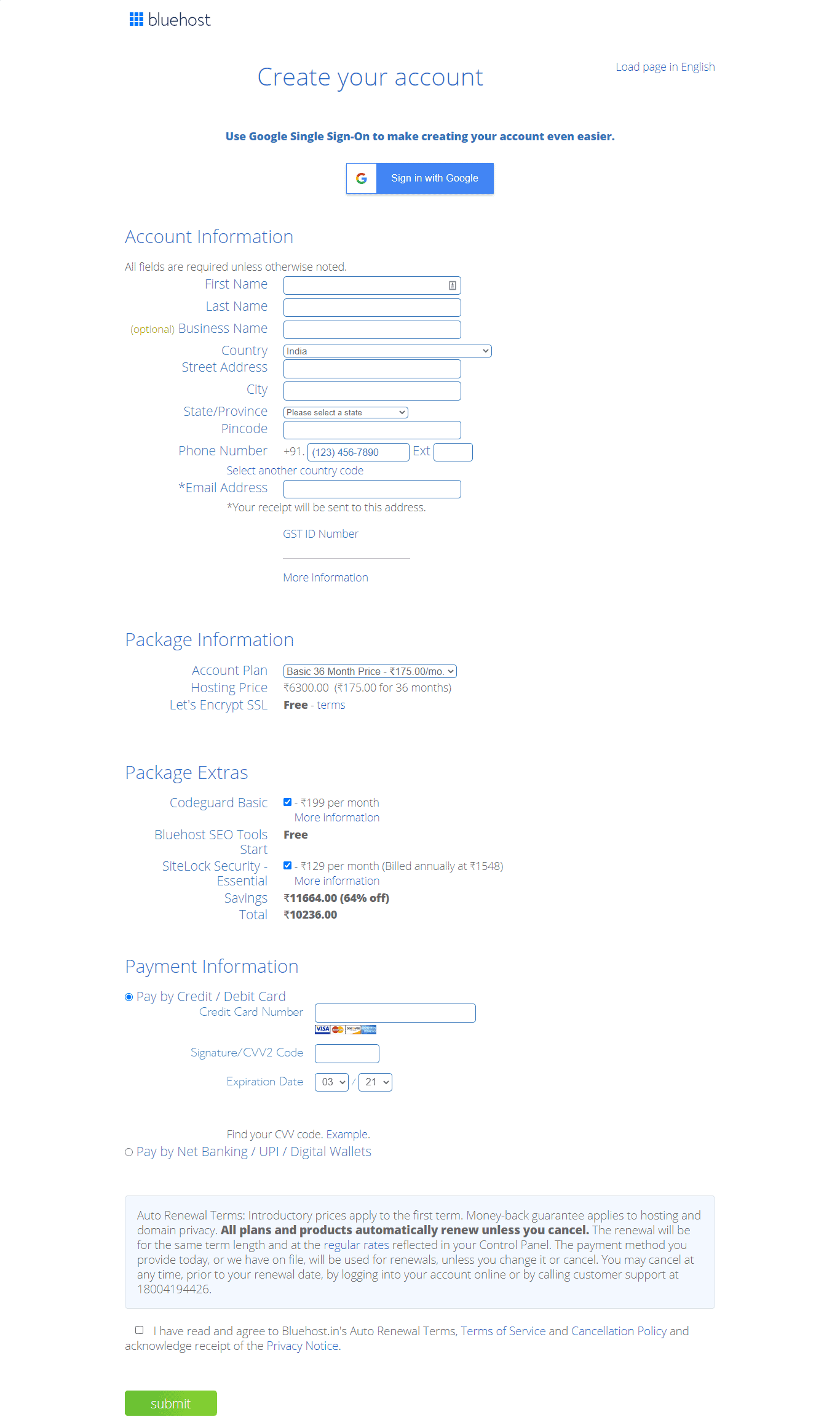
  • Step 4: Now, you’ll need to enter your account information. Confirm your account plan and then move forward. You should stick to a 12 monthly plan to start with. But, if you want to reduce the monthly cost, select longer subscriptions.

    Bluehost Create Your Account

    Pay with ‘PayU’. There is no monthly fee that Bluehost offers. It gives you the option to pay annually. Bluehost also offers a thirty-day money-back guarantee on plans. If you decide to cancel your plan within this time, you will get money back for the remaining time under a pro-rata refund.

  • You can also choose ‘Package Extras’ – SiteLock, CodeGuard, Domain Privacy, etc as required. Next, click on ‘agree to the terms and conditions’ and click ‘Submit.’

Top

B. Other Add-ons with Hosting and Domain

1. Site Backup Pro

There is an option of Site Backup Pro when you confirm your account. While this is optional, you should check the box as regular backups of the website are important.

Today, most sites face threats of hacking. So, if you encounter an issue related to your website being attacked, you don’t have to worry as you’ll have a backup readily available.

2. Domain Privacy Protection

WHOIS makes it easier to find information about a domain name. This data can be used by marketing companies. Plus, it makes your website vulnerable to threats in the future.

When you tick ‘domain protection’ in your registration process, it will make sure your site information is protected and visible only on Bluehost.

3. Sitelock and Bluehost SEO Tools

Click on SiteLock if you want added security for your website. You will be able to know more about the feature on the page itself. The ‘Bluehost SEO Tools’ option should be left unchecked if you don’t know about search engines.

Top

To Conclude,

Bluehost provides you with many options for hosting and domain. Choose a feasible one and complete the online registration process. It will take minutes to purchase a plan and domain from the website.

To purchase only a domain name, use these Bluehost domain coupons and get a discount.

Bluehost vs Wix – In-depth Hosting Comparison

By Sudhir Bhushan Leave a Comment

Bluehost vs Wix Choosing a hosting package depends on your business needs. If you don’t require much storage or bandwidth, select a basic web hosting plan. For expansion, you can select Pro plans or Cloud hosting.

But, picking the best hosting company can be a challenge. After all, you want nothing but the best for your website. So, if you have narrowed down your choices to Bluehost and Wix, then read this in-depth hosting comparison review to make a well-informed choice.

For more web hosting reviews, check out Bluehost vs DreamHost and Bluehost vs Hostinger.

Which is a Better Web Host – Bluehost vs Wix?

A professional website can help your business to get more visibility online. But to build a professional site, you need to purchase the best web hosting, which can be a task because of too many options. There are so many plans available for hosting today that you’ll get confused regarding the best option. As such, in this Bluehost vs Wix review, we have provided you with a quick comparison between the two. Read now to learn more about their pros and cons.

To buy web hosting from Bluehost, use these 100% working Bluehost Coupons.

Top

1. Bluehost vs Wix – General Overview

Bluehost Overview

General Overview of Bluehost

Bluehost was founded in 2003, and it’s been the most popular web hosting company since then. It powers more than 2 million websites and offers the best suites and tools for hosting.

The company lets you integrate with different CMS platforms and offer customised plans to scale your website. It also offers a single-click WordPress installation.

You’ll be able to migrate to other hosting plans if you aim at business expansion in the long run. It offers web hosting plans for every budget along with the best web hosting features. Read this Bluehost review of more information

Wix General Overview

Wix Overview

Wix was founded in the year 2006 and is a Cloud-based platform that helps you to build a website in no time. It offers powerful web building tools that eliminate the technical aspects of creating amazing websites.

It has more than 160 million registered users. It lets new users create a website from scratch using the drag & drop feature and offers more than 500 templates to customise the website.

You’ll be able to build all types of websites using Wix that includes personal blogs and business sites.

Top

2. Wix vs Bluehost - Types of Hosting

Types of Hosting Offered by Bluehost

Types of Hosting Offered by Bluehost

Bluehost offers a hosting plan for your every need. It offers Shared hosting for start-ups and VPS hosting if you need to scale your website. It also provides Dedicated and Reseller hosting plans with premium options.

Bluehost offers WordPress hosting with simple integration and single-click installation options. With Managed WordPress hosting, you don’t have to worry about site issues. It offers WooCommerce hosting for eCommerce websites.

It also provides professional emails and affiliate programs.

Use Bluehost Coupons to purchase premium web hosting for your website at an economical price.

Types of Hosting Offered by Wix

Types of Hosting Offered by Wix

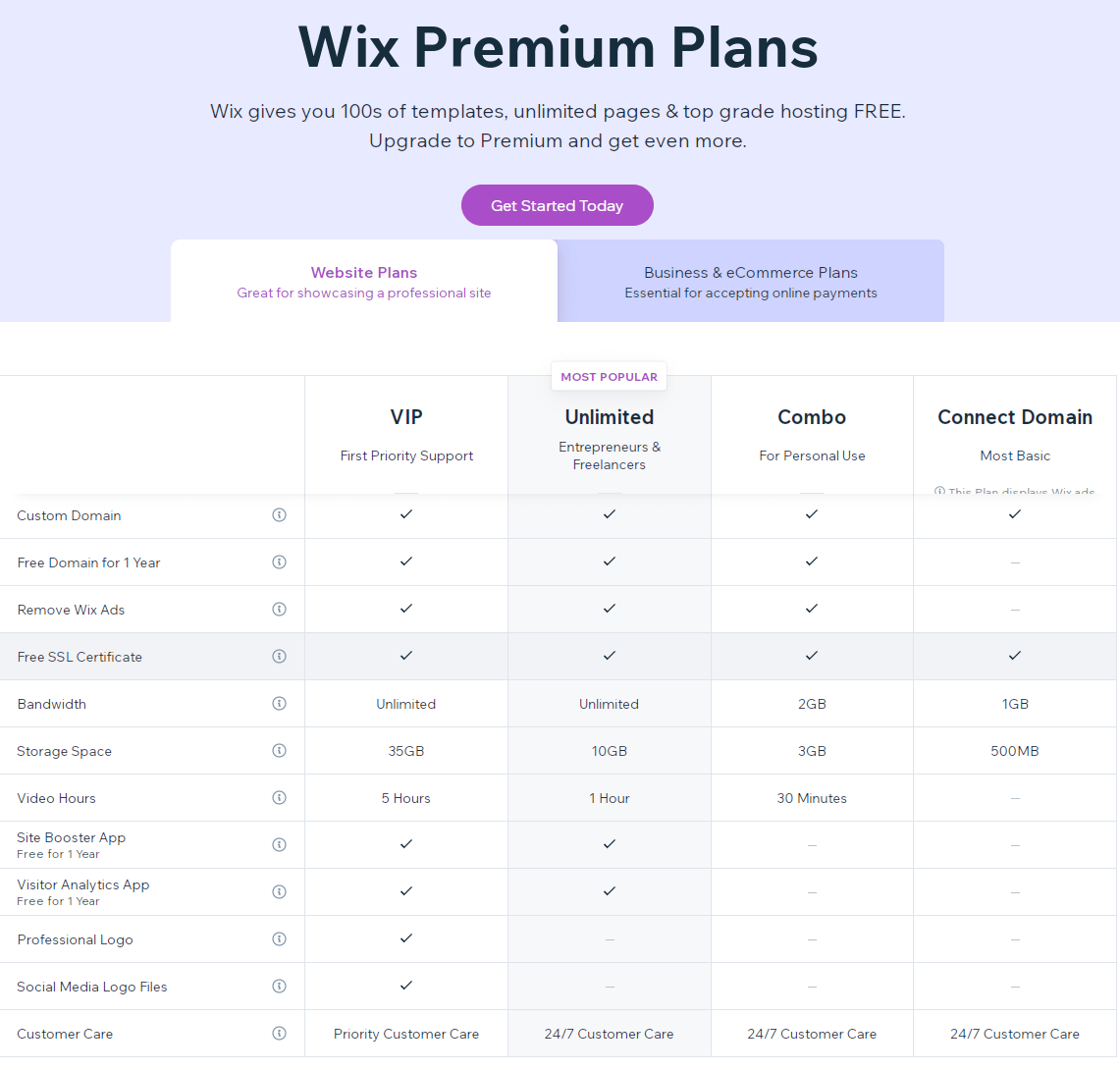
Wix offers different kinds of hosting plans according to the budget. With a free plan option, you’ll be able to create a free site for your business. It offers a connect domain plan and combo plan with different features.

It offers eCommerce and unlimited plan options. It also offers special VIP plans for people who want added hosting features.

Verdict: Both the companies offer feasible plans, but Bluehost wins as it offers plans based on business requirements.
Top

3. Bluehost vs Wix Review – Hosting Features

Hosting Features Offered by Bluehost

Bluehost offers features depending on the hosting plans you choose. It provides unlimited disk storage, unlimited domain hosting along with a drag & drop feature. It offers an uptime of 99.9% and also supports dual quad processor performance. It also lets you optimise your website’s performance.

Hosting Features Offered by Wix

Wix offers many customised features for website building. It offers stunning templates with an editor and total design freedom. It offers integration with SEO tools & plugins and mobile customization. Wix offers advanced designing features with unlimited fonts. The company also offers an uptime guarantee of 99.9%.

Verdict: Bluehost offers superior web hosting features, so it wins here. To purchase web hosting from Bluehost, use these Bluehost Hosting Coupons
Top

4. Wix Hosting vs Bluehost - Security Features Offered

Security Features Offered by Bluehost

Bluehost hosting plans come with a three-way spam filter that offers complete protection from hackers. With malware scan, you’ll be able to fully scan your website. It offers password protection and filtered options for files. With two-factor authentication, it provides full security control and lets you install SSL certificates

Security Featured Offered by Wix

Security Features

Wix offers comprehensive security control for your website. It offers an SSL certificate that helps to gain visitors’ trust. It offers DDoS protection along with a website monitoring system. Wix offers centralized website security, which means that all the security updates are automatically applied on the website. It also offers advanced security solutions with higher hosting plans.

Verdict: Both the web-hosting providers offer great security measures, so both are winners here.
Top

5. Bluehost vs Wix – Money Back Guarantee

Bluehost Money Back Guarantee

Money-Back Guarantee

The company offers a 30 days money-back guarantee from the day you make an online application for the refund. There will be some charge on the free domain in the return policy.

The amount depends on the plan that you opted for. The company does not offer any refunds on cancellations that are made after 30 days.

To register only a domain, make use of these to get a discount.

Wix Money Back Guarantee

With Wix, you’ll be able to cancel your plan within 14 days and also receive a full refund. But, a refund from Wix is applicable for only premium plans. It lets you cancel your plan within the 14 days trial period, so you’ll be able to use the features and then apply for cancellation.  

Verdict: Bluehost offers a better money-back guarantee policy.
 
Top

6. Wix or Bluehost - Customer Support

Bluehost Customer Support

Customer Support

The company offers reliable customer care that includes phone, chat, and email support. The live chat feature allows you to connect to the customer care executive for any issues related to your site. It also offers a comprehensive knowledge base system if you need more resources. It offers amazing billing assistance.

Wix Customer Support

Wix offers complete phone and email support. You’ll be able to submit a support ticket in case you need a solution for any issue related to your website. It also offers a knowledge base of articles for your reference.

Verdict: Bluehost offers easily accessible customer care support, so it wins here.
Top

7. Bluehost Hosting or Wix – Payment Options

Bluehost Payment Options

Bluehost has a flexible payment policy and accepts different forms of payments, including major debit and credit cards. It accepts payments via PayPal, cheques, and online transfers.

Wix Payment Options

Payment Option

Wix accepts all credit and debit cards including Visa and MasterCard. It accepts other location-based payment options. It also accepts money transfer option.

Verdict: Both the companies accept major credit and debit cards, so both are winners here.
Top

Conclusion

With superior loading, great uptime, and other flexible features, Bluehost is a clear winner here. Wix is still the number one choice for free sites. But, you won’t get all hosting features if you choose a free site option.

Bluehost offers hosting options that will help to scale your site. It offers unlimited disk space, which is not there in Wix. And the plans offered by Bluehost are affordable compared to Wix. For start-ups and bigger companies, Bluehost will always be the first option in hosting.

What’s more, you can get amazing discounts on domain registration with Bluehost domain coupons.

Bluehost vs AWS (Amazon Web Services) – A Quick Comparison

By Sudhir Bhushan Leave a Comment

Bluehost vs AWS Moving on from our previous two posts – Bluehost vs HostGator and Bluehost vs BigRock – here is another hosting review that’ll help you make an informed choice when choosing a web host.

Today, most companies offer a wide range of hosting plans to give your website an advantage in the web space. Thus, if you cannot decide between Bluehost and Amazon Web Services (AWS), then this quick comparison of these two companies can help.

Why to Choose Bluehost vs AWS?

Choose a hosting company that is well-known and offers the best web hosting features is essential. A good hosting is one of the cornerstones of a successful website. It can help make your site secure. It can boost your site’s performance and page speed. It also offers SEO tools to optimize your website and increase its rankings. Hence, while there are many free hosting options available, it is always best to choose a paid web hosting. For this read, let’s check out how Bluehost vs Amazon Web Services compare when pitted against each other.

To buy web hosting from Bluehost, use these 100% working Bluehost Coupons.

Top

1. Bluehost vs AWS (Amazon Web Services) – General Overview

Bluehost Overview

General Overview of Bluehost

Bluehost is the most popular web hosting company that powers more than 2 million websites. The company offers complete web hosting solutions and a range of web hosting plans.

If you need a feasible plan for a start-up or expansion, then Bluehost offers affordable web hosting plan options along with Bluehost Hosting Coupons.

With extensive tools, it lets you integrate with software and plugins to enhance your website. Bluehost offers a high level of reliability and user-friendliness. It also lets you integrate with powerful CMS platforms like WordPress.

Amazon Web Services (AWS) Overview

AWS Overview

Amazon Web Services offer the most comprehensive Cloud computing solutions. It offers more than 175 fully integrated services from data centres globally. The fastest-growing start-ups and large organizations are using AWS to lower the cost and become more agile.

AWS offers complete functionality and features as compared to any other Cloud-computing provider. It makes use of the best technology that includes machine learning, artificial intelligence, IoT (internet of things), computer storage, and databases.

AWS is cost-effective, and you’ll be able to move all your existing applications to
Cloud technology to build anything you imagine.

It has the largest community of customers and partners. AWS offers the most proven operational expertise with the fastest pace of innovation.

Top

2. AWS vs Bluehost - Types of Hosting

Types of Hosting Offered by Bluehost

Types of Hosting Offered by Bluehost

Bluehost offers Shared hosting, VPS hosting, Dedicated hosting plans, Reseller and managed web hosting plans with different options.

With WordPress hosting, you’ll be able to install WordPress with a single click. It also offers WooCommerce hosting that is ideal for eCommerce websites. It lets you integrate with various tools & plugins and offers different affiliate features as well.

Further reading: What’s better – Shared Hosting vs VPS hosting

Types of Hosting Offered by AWS

Types of Hosting Offered by AWS

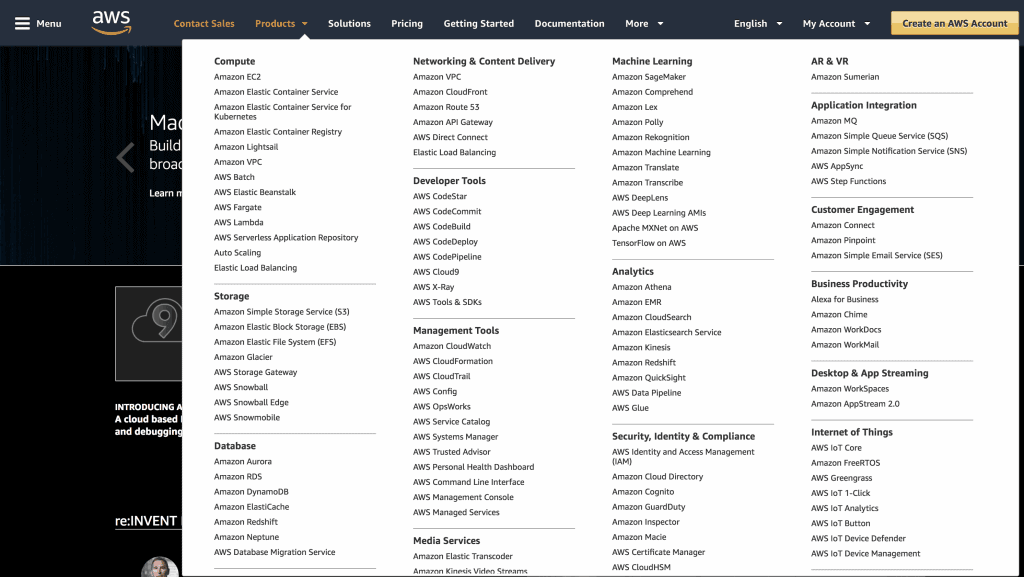
AWS offers a complete range of products for every sector, but the most popular one is Cloud computing. With Amazon Lightsail, you’ll be able to make the right head-start as the products are focused on the small and non-technical market.

With Amazon ElastiCache, you’ll be able to get millisecond performance at a Cloud-scale when you use it building real-time applications for your business. It also offers authentication and data sync features.

Verdict: Bluehost wins here as it provides simple hosting plans compared to AWS, which is a bit complicated.
Top

3. Bluehost vs AWS Review – Hosting Features

Hosting Features Offered by Bluehost

Bluehost provides an array of features in its hosting plans. The hosting plans support a variety of coding types – PHP, JavaScript, and Flash.

Most hosting plans also offer an unlimited amount of disk space and email accounts that can help you in website expansion.

Bluehost offers 99.9% of uptime, which is good for all websites. With some hosting plans, you’ll also get an unlimited number of domain names. Read this Bluehost review to learn more.

Hosting Features Offered by AWS

AWS gives you virtual Cloud storage and offers scheduled backups. The backups are beneficial when something goes wrong. AWS hosting solutions also support various platforms that include Ruby, WordPress, and Joomla.

It also lets you use Windows and Linux hosting options. It offers an uptime guarantee of 99.99%, which is nearly perfect. The features offer great reliability and complete functionality.

Verdict: Both Bluehost and AWS are winners here as both offer amazing features on plans.
Top

4. AWS vs Bluehost Review - Security Features

Security Features Offered by Bluehost

Bluehost offers effective security measures with its plans. It includes a CodeGuard and a free SSL certificate from Let’s Encrypt. It automatically takes a backup of your website and keeps it safe.

It offers a domain privacy tool that keeps all sensitive information safe from the public. It prevents hackers from getting your site information via phishing attacks. It offers spam protection, SiteLock third-party Firewall and complete malware scan.

Security Features Offered by AWS

Security Features

AWS provides different security features based on services. It offers an identity and access management feature that creates rules, groups, and user permissions to allow or deny access to AWS resources.

It offers a virtual private Cloud feature that gives control over inbound and outbound network traffic. AWS direct connect allows you to establish a private virtual interface between Amazon’s virtual private Cloud and on-premise network.

AWS offers high-end security features compared to Bluehost.

Verdict: Bluehost provides security features based on hosting plans, whereas AWS offers a lot of technical security features and updates. Its a tie.
Top

5. Bluehost vs AWS – Money Back Guarantee

Bluehost Money Back Guarantee

Bluehost has 30 days money-back guarantee on web hosting plans. If you cancel your hosting plan within 30 days and your plan includes a free domain, the company will deduct some non-refundable domain fee.

The amount depends on the plan that you opted for. The company does not offer any refunds on cancellations that are made after 30 days.

To register only a domain, make use of these Bluehost domain coupons to get a discount.

AWS Money Back Guarantee

Money-Back Guarantee

If your software is listed as a free trial product, AWS refunds for software changes made within 7 days from the conversion of the free trial to paid.

Other cases where their approval is not needed for a refund include a product based on usage and pro-rated subscription cancellations. 

Verdict: Both offer a different return policy, so both are winners here.
 
Top

6. Amazon Web Services vs Bluehost - Customer Support

Bluehost Customer Support

Customer Support

Bluehost offers 24/7 customer support that includes mail, chat, and phone. It also offers a comprehensive knowledge base that helps you get information about the hosting plans and website development.

AWS Customer Support

You can contact AWS support through your AWS account. In the support console, choose the option to create a case. Select your preference for the contact options and choose ‘submit.’ It also offers a live chat and ticketing system.

Verdict: Both win here.
Top

7. Bluehost vs AWS (Amazon Web Services) – Payment Options

Bluehost Payment Options

Payment Option

Bluehost accepts all major Credit and Debit cards for payments that include MasterCard and Visa. It also accepts other payment modes – Paypal, purchase orders, and cheques.

AWS Payment Options

AWS accepts all major Debit and Credit cards. It accepts ACH direct debit payments and SEPA direct debit payments for European customers.

Verdict: Both offer flexible payment modes, so its a tie.
Top

Conclusion

AWS may be great for Cloud hosting solutions and other application services, but Bluehost offers easy solutions for scaling your website. AWS is better than Bluehost only if you have a tech background as it’s a bit complicated.
Even if you use the AWS Lightsail feature, you’ll still miss out on a lot of features that Bluehost offers in its basic plans. Bluehost is better for starting up with a new website.

  • « Previous Page
  • 1
  • …
  • 4
  • 5
  • 6
  • 7
  • 8
  • …
  • 10
  • Next Page »

DMCA
PROTECTED


Back to Top

© Copyright 2026 BHICoupons.in · All Rights Reserved · All Logos & Trademark Belongs To Their Respective Owners·

Bluehost Coupon