BhiCoupons.com

  • Home
  • Reviews
  • Blog
You are here: Home / Archives for Blog

How to Use Bluehost cPanel: Step-by-Step Beginner’s Guide

By Sudhir Bhushan Leave a Comment

How to Use Bluehost cPanel cPanel is a Linux-based hosting control panel that is widely popular because of the flexibility it offers. It has a user-friendly interface compared to other control panels. It is used along with MySQL, PHP, and Linux Stack, and in operating systems like Cloud Linux and CentOS.

If you are starting your online business, then choosing the right web hosting is important. With Bluehost Coupons, you can buy web hosting at an affordable price. What’s more, when you purchase web hosting from Bluehost, it offers you Bluehost cPanel that not only helps you to handle most of the administrative tasks but also offers services like renewals and support. 

Bluehost cPanel – What Does it Offer?

Bluehost cPanel lets you monitor, control, and tweak the technical side of your hosting account. cPanel offers easy access to people who are not tech-friendly. It offers a graphical user interface that is operated from the user’s web browser that distinguishes cPanel from its peers. It also rolls out auto-updates for new features to stay on top of security, which makes it more intuitive and stable. 

Top

A. Bluehost cPanel – Things to Know

Bluehost cPanel offers excellent support and user functionality. It offers a lot of open space so you’ll be able to explore the panel easily. It uses a single typeface and clear strokes. With Bluehost cPanel, you’ll get to spend more time on your website than your admin page as it offers a complete performance-driven dashboard.

The many icons that are available in the panel are lined up with a flat design. Almost all the Bluehost accounts include cPanel support, which helps you to manage your website efficiently.

Bluehost’s customised control panel includes some added features that make it easier to manage WordPress websites. It comes with simple add-ons where the clients can access various applications like Joomla, Drupal, WordPress, and Zencart.

The control panel is a command centre where you’ll be able to install applications, scripts and also take a complete backup of your website. Whether you are a beginner or an advanced developer, cPanel will help meet all your web hosting needs.

Further reading: How to Install WordPress on Bluehost

Top

B. Reasons Why VPS Hosting Is Ideal For Growing Websites

  • The cPanel lets you control important technical aspects of your website or hosting account. It lets you add or remove different domain names.
  • It lets you install CMS platforms like Drupal and WordPress with the extension Softaculous.
  • The control panel is adept at managing all your files using the in-build file manager feature.
  • With the panel control, you’ll be able to manage website backups and also restore the backed up data if need be.
  • It lets you check the vital stats about your site that includes the traffic log. With the traffic log feature, you’ll be able to analyze the marketing part of your site.
  • It lets you monitor your web account’s crucial usage – disk space and bandwidth.
  • With the panel support, installation of SSL on your site becomes a stress-free task.

You’ll be able to locate your cPanel by adding it to your domain name when you purchase a plan. Once you reach the panel, you need to add a username and password.

You’ll also be able to find cPanel inside your hosting provider’s dashboard. In this case, it’ll be inside the Bluehost’s dashboard.

In Bluehost, you’ll be able to locate your cPanel by clicking on the Advanced option. If you can’t locate the panel, then you can reach out to the customer support team of Bluehost.

Buy web hosting and other add-ons with Bluehost Hosting Coupons to get attractive discounts.

Top

C. How to Access a Bluehost Control Panel?

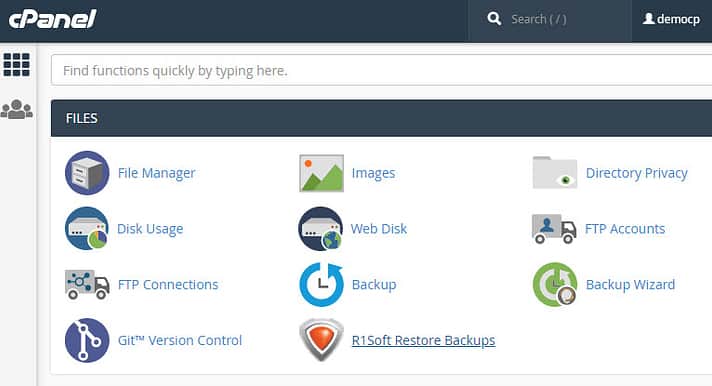
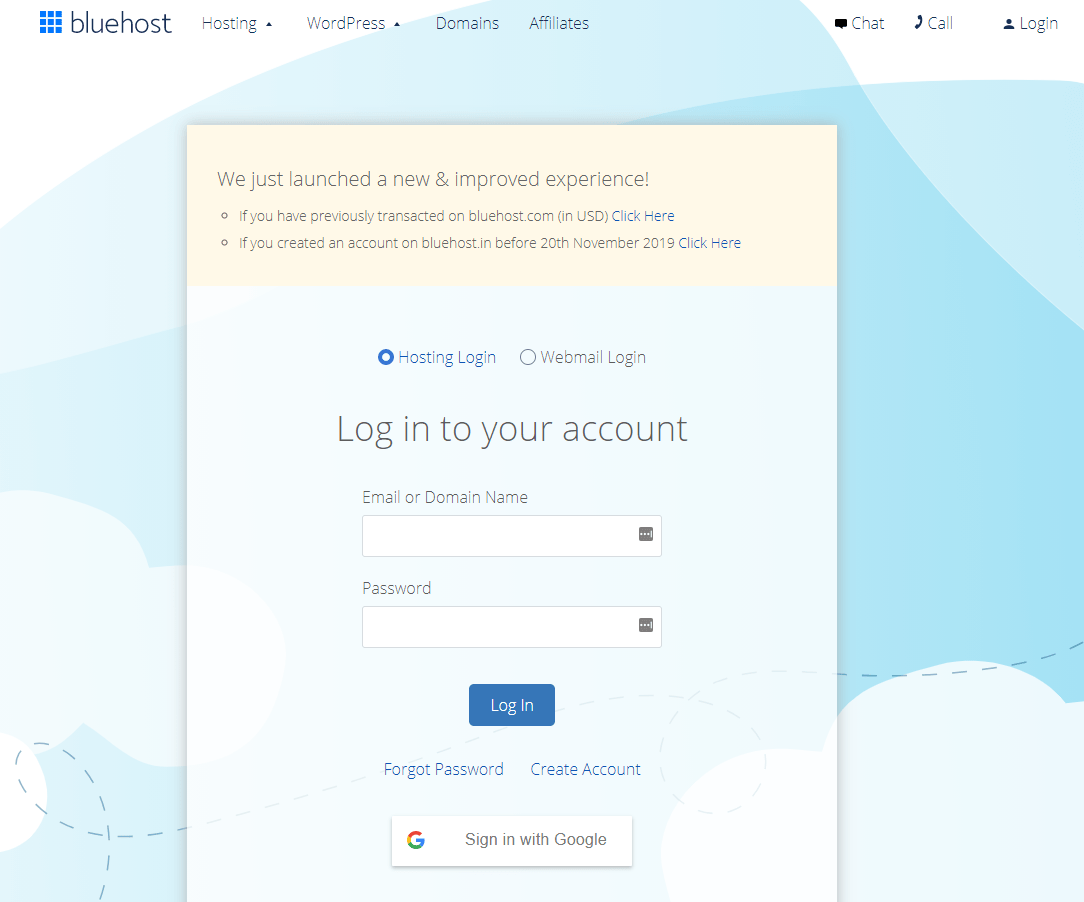
To access your cPanel account you need to log in via their website and type in your domain name and password. Once you log in to the account, you’ll notice that the left-hand side column will show the frequently accessed area in the control panel.

On the right-hand side, you’ll see other tools and resources – database, domains, and files in the system.It also lists the logs, different mails, and your preferences. It lists SEO tools, software, and security.

The sub-sections of the cPanel includes:

  • File Manager
  • Bluehost File Manager

    Under the file manager section, you’ll be able to manage the files on your Bluehost web server. The various directory privacy tools will allow you to manage the permissions of each directory in your hosting account.

    All the FTP-related options will make it possible for you to set up, remove, or even modify the credentials of FTP. This makes it possible to delete or upload files to your web server without you needing to manually login to Bluehost cPanel.

    There is also a disk usage option that allows you to see the amount of disk you’re using on the server.
  • Managing Databases
  • Bluehost Managing Databases

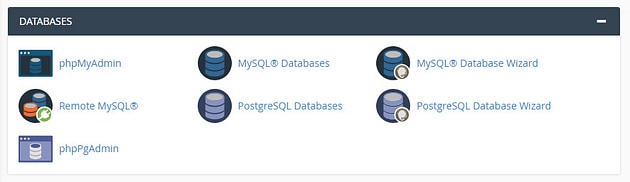
    The Bluehost control panel also lets you manage MySQL databases, which is essential for WordPress. Using the PHPMyAdmin feature in the cPanel, you’ll be able to perform the administrative tasks on your database.

    You’ll be able to edit and delete via a dedicated interface. There are many other options that you can use through the feature. It helps you to create a MySQL database and users. This helps you to establish a remote connection via any of your databases.
  • Managing Domain Names
  • Bluehost Managing Domain Names

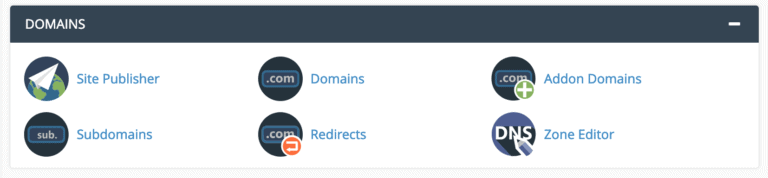
    In this section, you can manage the domain names that are connected to your Bluehost account. It allows you to add additional domains to your cPanel via add-on domain options.

    You’ll also be able to add a domain under the root domain section of the panel. The section also comprises DNS tools with the simple zone editor feature.

    It allows you to edit your DNS records along with domains. This won’t be of use to beginners, but most developers use this feature for managing different domains in the server. Purchase premium domain with these Bluehost domain coupons.

  • Managing Email Accounts and Monitoring Traffic
  • Bluehost Managing Email Accounts

    The Bluehost cPanel comes with many email-related options. If you’re a beginner, you won’t need anything other than the email account option to create professional emails for your domains. The feature also provides spam handling via SpamAssassin.

    cPanel lets you monitor the raw traffic on your site along with the bandwidth usage. There is also an error option that lets you browse all the recent errors caused by various issues or malfunction of scripts.

  • Increasing Security
  • There is a separate security option in the control panel. It contains all the options related to the security of your web account. It offers root access and SSH access information.

    It has an option of IP blocker that blocks all the IP addresses of your choice from accessing the website. It also has an SSL module that easily allows you to download the SSL for your website.

    The hotlink protection feature allows you to restrict the usage of files and different images on your server on third party websites. This helps to save bandwidth space.

Top

In Short,

There is no multiple sign-in requirement to log in and access your Bluehost control panel. Once you log in, you’ll be directed to the control panel where you can manage your account and make quick single-click installations on your site.

You’ll also be able to access your site builder, email applications, and database options on the server. This makes it easy to set up your new website with added tools and guides.

What Bluehost is one of the best choices for web hosting? Read this Bluehost review to find out!

How to Setup a Professional Email Address with Bluehost

By Sudhir Bhushan Leave a Comment

How to Setup a Professional Email Address with Bluehost Businesses today take the customised route to get a good exposure. Right from merchandise to gifting, everything is customised. Professional email addresses use the domain name of the company instead of a generic email set-up.
In a new business set-up, if you make an email with a regular provider like Gmail, it won’t look professional.

Since any person can create accounts with these email addresses, it becomes difficult for customers to trust such emails as legitimate email accounts.

The customers are impressed with businesses that use a customised email domain, so it does have an added advantage.

Bluehost is the most popular web hosting provider that offers an excellent range of hosting plans and customised email solutions. Read this Bluehost review to know more. So, you’ll be able to easily set up a professional email address using the Bluehost control panel.

Why Set up a Professional Email Address with Bluehost?

A professional email address with Bluehost is a custom mail address that is ideal for business purposes. It is a short address that has a great recall value. It ensures that every mail you send to customers has a standard format; helping you maintain consistency.

With a customised domain, there is complete validity. These emails are less unlikely to be marked as spam by your customers or potential clients. The best part, a professional email address helps promote your brand as it has your product or business name.

Use Bluehost Coupons to purchase an email hosting package.

Top

A. How to Set-up Bluehost Email: Step-by-Step Guide

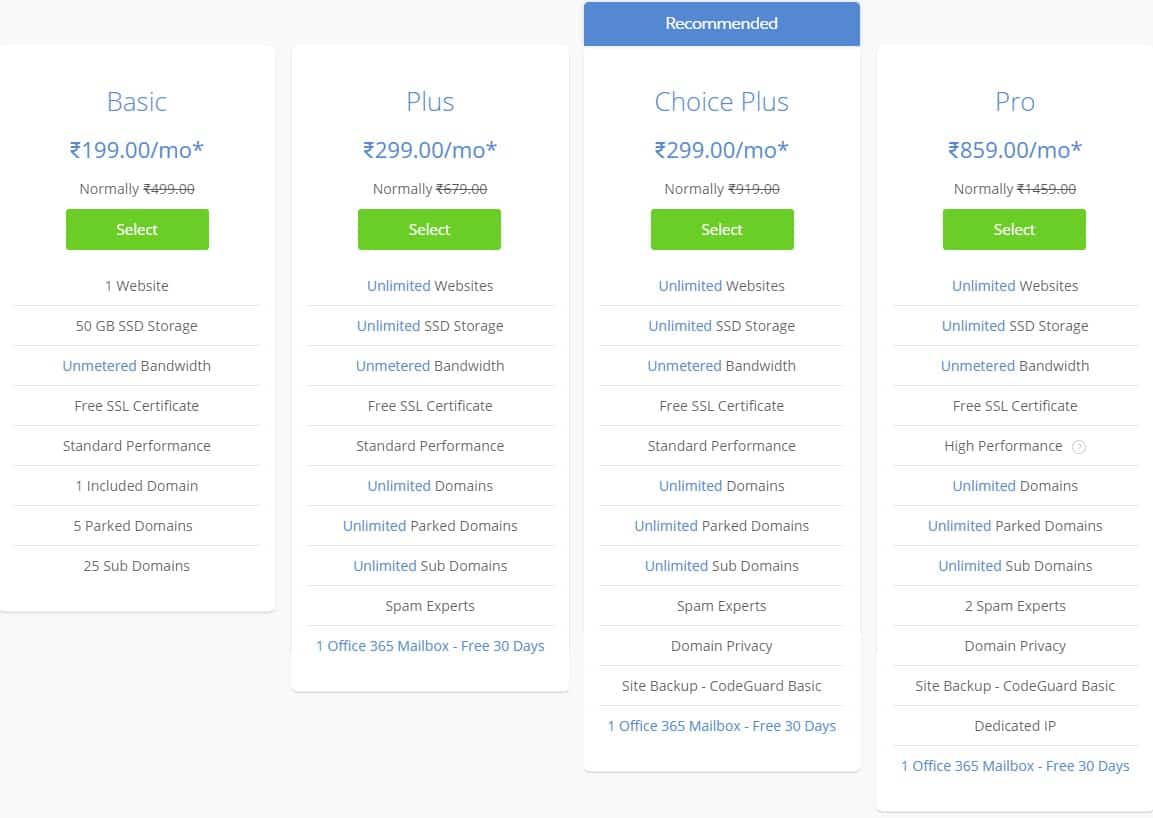
  • Step 1: Once you subscribe to the basic hosting plan, it offers 5 email addresses. There is a Microsoft email option available with premium service, but you can migrate to that plan once your business expands.

    Bluehost Shared Hosting Plan

    Bluehost offers easy email migration. You have an option of hosting your existing domain name at Bluehost. It also allows you to search for your desired custom domain.

    Bluehost Create a domain

    To check the availability, you need to enter the domain name of your choice and click on the ‘Next’ button. With this, the domain name will be set up. Your domain name can be your site address or you can create a new one.

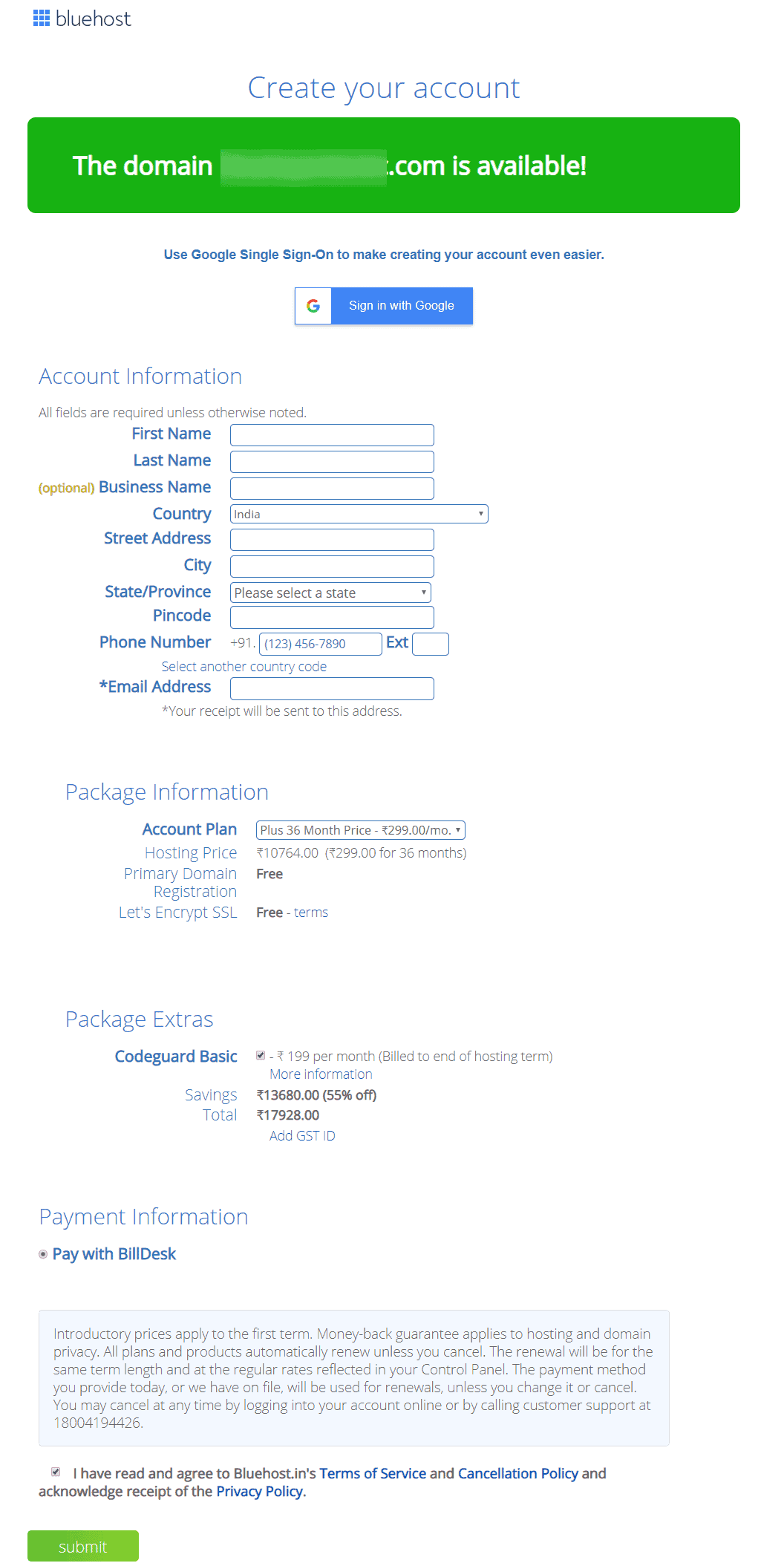
  • Step 2: This is where you’ll create your account. Enter your business-related information, enter any current mail address – it could be any free email address you have with – Gmail or Yahoo.

    Now, you need to enter the account information that includes – name, address, city, state, zip code, phone, and email.

    Bluehost Account Information

    Select a 12-month plan as it’ll help to minimize your business cost in the initial phase. You need to un-check the boxes like domain & privacy protection, site lock security essential, and CodeGuard basic.

    Now, enter the package information based on your business needs. Enter the payment information and click on the ‘submit’ button.

  • Step 3: Click on the ‘create your account’ option, create a new password for login, agree to all the remaining terms & conditions and click on ‘create an account.’
  • Bluehost Create Your Account

  • Step 4: For creating your business email, go to the Bluehost login link, enter your domain name and password, and click login.

Now, follow these steps:

  • Go to the advanced option and click on create an email account.
  • Enter your desired username and choose a prefix with your new business email account. Use underscore or period if you have more than one Bluehost domain. Use the drop-down menu for selection.
  • Now create a password, use the one you have, or ask Bluehost to generate a new password for you. At the bottom, the site will ask you to determine the webmail mail client and mailbox size. Click the remaining settings as default and click on the create option.
  • The mailbox is now created. Use Squirrel or Roundcube to access the mailboxes. They are front enders to access the content from the mailbox. Ignore the technical details and move ahead.
  • Now write and send a test mail to the newly created mail address. Go to the email box and check the email. You’ll be able to create multiple email accounts using the above process.

Top

B. Access to Bluehost Webmail

Once you get an email account, it’s time to access it online. You’ll be able to do this through a webmail service that allows complete online access without the need of setting up.

  • Go to the Bluehost webmail login and enter the email & password you created. Once you click on login, you’ll be taken to the Inbox.
  • Through the Bluehost control panel, login to your account. On the left side, click on the Email & Office option. Look out for a domain name that is associated with your mail address.
  • Then click on the manage button. Now select the email by clicking on the check mail option and choose the default webmail application.
Top

C. How to Connect New Emails to Outlook?

  • Step 1: In the Microsoft Outlook option, enter your mail address → click the connect option. It’ll take three to four minutes to process.
  • Step 2: If automatic configuration fails, you’ll need to set up the account using the manual set-up process.
  • Step 3: Click on the IMAP option and then on connect devices → find all the details of the mail client settings.
  • Step 4: Now go to Outlook and enter the IMAP account setting details incoming mail server, port number, and outgoing mail server.
  • Step 5: Click next and enter your password. Once it is connected, click on the done button.

Once the inbox is displayed, you’ll be able to send and receive emails from the newly created professional email address. Microsoft often sends a test mail to check for connection settings.You can also set up your Microsoft 365 email account on Mobile Devices.

Top

D. Managing Your Email Address

Bluehost offers the most flexible way to manage your business-related professional email address. You can go to the Advanced option and email account link in your Bluehost account. Click on the manage link to manage all your email accounts.

It will help to display all the options that are used for your mail account. You’ll be able to use it to send automated responses, update an account, change the password, and manage email filters. You’ll also be able to free up your mail storage to allocate new storage to the account under this option.

Buy email hosting now with these Bluehost Hosting Coupons.

Top

#Selecting the Best Professional Email Provider

The provider you choose for the business email should have a good reputation and experience. It’s one of the first aspects your clients will consider. The provider should enable you to save, archive, and store all your messages.

Look for strong security measures as it helps you to stay safe and protects your mail from unauthorized access. If your business needs calendar and productivity tools, then consider integration. A provider should provide you with the best integration service.

You also need to look for a spam filter that detects and filters out the spam messages. Storage is also an important factor when you choose an email provider.

Bluehost hosting solutions offer you plans that provide the best storage for email accounts. With Pro plans, you’ll get better access. You can also look for advanced features like recall messages and schedule email tasks.

Check out these comparison reviews to know how Bluehost compares to other hosting providers when it comes to Email hosting.

  • Bluehost vs HostGator
  • Bluehost vs BigRock
  • Bluehost vs HostingRaja
  • Bluehost vs HostPapa
Top

To Sum Up,

Your business needs a professional email set-up in this competitive time. With a customized email set-up, you’ll be able to make the right impression on your business clients.

It also gives you an extension of your website service. Follow the above steps to create a professional email ID with Bluehost and bring a positive change to your business. And to purchase a new domain name, use these Bluehost domain coupons to get a discount.

What’s Better For You? Shared Hosting Vs VPS hosting

By Sudhir Bhushan Leave a Comment

Shared Hosting Vs VPS Hosting Hosting can be a confusing subject for a person who wants to create a new site. Once you decide on getting a new website, you need to choose a hosting provider that offers you the best server space and great web hosting features.

Many hosting types are available for different sites. Shared Hosting VS VPS Hosting (Shared hosting vs VPS hosting) are the two most popular hosting options that are available.

Shared Hosting VS VPS Hosting – Which is Better?

One of the top questions when searching for the best web hosting for a site is which is better Shared hosting or VPS hosting. Based solely on price, Shared web hosting wins as it is cheaper compared to VPS hosting. Shared hosting is also the top choice among start-ups and newbie bloggers. However, performance-wise, VPS hosting is much much better than Shared hosting. In short, each has its pros and cons and if you want to know how they compare, then read this Shared hosting vs VPS hosting review.

Top

A. What is Shared Hosting?

Shared hosting is the cheapest option, and most new users stick to it because of its affordability and flexibility. Shared hosting is similar to sharing an apartment where you have to share things. In this hosting, you need to share resources like disk space, CPU, and memory.

It provides limited bandwidth as it has a single server. It is a perfect option if you need to start a new blog or a personal site. If you don’t know much about website development, then Shared hosting is an ideal choice for you.

Make use of Bluehost Coupons to buy Shared hosting today!

Top

B. What is VPS Hosting?

VPS hosting provides a user with a specific set of resources that helps a site to scale better. With this, you’ll still be sharing a single physical server, but each website will have dedicated features and resources. Also, other websites on the server will not affect your site, so that’s an advantage.

Since VPS hosting provides a dedicated partition for each user, resources are always available. It is a perfect option if you’re looking for expansion and if your budget is higher.

Want to purchase VPS hosting? Use Bluehost Hosting Coupons to get a massive discount!

Top

C. Shared vs VPS Hosting - Quick Comparison

1. Shared Hosting vs VPS Hosting: Performance

The ability to access the site quickly matters the most. Shared hosting performs on the resources that your host has implemented for speed which includes CDN and SSD. With a Shared plan, other websites on the same server could affect your performance. And, if your site’s performance is not up to par, then it will affect your ROI.

VPS hosting offers more bandwidth and resources compared to Shared hosting. It gives you more flexibility to configure your applications on the server. But, you’ll have to make sure that you have a dedicated system administrator to keep your server running smoothly.

Both Shared and VPS hosting offer different uptime depending on resources. Also, for multiple sites or sites with high traffic demands, VPS hosting is a better option.

Verdict: VPS outperforms Shared hosting in performance. You can expect more bandwidth and better speed with VPS plans.

2. VPS Hosting vs Shared: Scalability

Scalability is a factor that accommodates the growth of your website. Several aspects of scalability include server capabilities and storage. In Shared hosting vs VPS, the latter is much easier to scale.

Shared hosting is good for small business websites or personal blogs. However, with an increase in traffic, you may have some trouble in performance. So, when the demand exceeds the server resources, you’ll need to upgrade your plan.

VPS hosting allows you to scale quickly as per site requirements. In VPS, resources can be adjusted to adapt to different traffic trends. Most eCommerce stores need more bandwidth to handle a traffic surge on sale days.

Verdict: VPS hosting again wins in scalability feature as it scales a website based on resources and traffic needs.

3. Shared Hosting vs VPS Hosting: Resource Allocation

Just like every month, you need to recharge or pay the bill for your mobile plan; similarly, everything works on set features and resources when it comes to web hosting. Hosting also comes with storage capacity, memory, and server resources that are utilized according to different plans.

In Shared hosting, you’ll have to share your site with other websites on the server. If one website uses too much bandwidth, then it’ll affect other websites on the same server.

VPS hosting is less restricted compared to Shared hosting as you hold a larger share of the server. So, you’ll get access to more resources, which won’t affect your site speed.

With VPS, you’ll get root access over the server environment. It means you’ll be able to install added software on your system along with different apps. It will also let you edit files in your system server.

Verdict: With Shared hosting, you could be more reliant but VPS allows you to use more resources. VPS has an upper edge here.

4. VPS vs Shared Hosting: Security and Configuration

In Shared hosting, if there is a security breach on one site, then it can affect all other sites on the server. This is not an issue with VPS hosting. Also, VPS hosting offers better security features than the basic ones offered with Shared hosting.

The configuration feature is sorted in Shared as the host takes care of it. In VPS, the configuration is complex as it works on managed and unmanaged plans. Managed VPS is similar to the Share plan as the set-up process is taken care of by the user. Whereas, Unmanaged VPS plan is ideal for developers.

Shared hosting plans cannot be customized as they have a limited set of features. But, VPS can be customized as there’s more flexibility of resources and features.

Verdict: VPS offers better security, but Shared hosting offers better configuration. So, both get a point here.

5. Shared vs VPS Hosting: Managed Services

Shared servers are managed by the hosting company, which means they are regularly updated and secured. If you buy a basic Shared plan, you don’t have to worry about your site issues.

If there is any glitch related to the website, then it’ll be taken care of by the hosting company. It is more managed compared to VPS.

VPS hosting can be managed or unmanaged depending on the network or host you choose. If you happen to choose unmanaged, then you’ll be responsible for any updates or installations on your site.

With Managed VPS services, you’ll get high-quality assistance from the support team of the hosting company. Read this Bluehost review to learn the different type of VPS hosting offered by Bluehost.

Verdict: Shared hosting wins here as it offers better-managed service.

6. Shared Hosting vs VPS Hosting: Price

Shared hosting and VPS hosting come with different pricing tiers. But, Shared hosting offers cheaper plans as it comes with limited features. It’s preferred mostly by new websites or blog sites. It offers limited bandwidth, email, and space, and that’s the reason it is so affordable.

VPS hosting comes with different plans which include features like security, resources, and space. If you opt for a higher VPS plan, you’ll have to pay extra. VPS hosting also offers higher upgrades, so it’s an ideal option for the expansion of your website.

Many hosting companies also offer promotional offers on both Shared and VPS plans. So, you can pick from the best available plan.

Verdict: Shared hosting is cheaper and offers basic plans for a new website, so it gets a point here.
Top

#Pros and Cons of Shared Hosting

    Pros

  • Beginner-friendly
  • Standard set-up
  • Less technical experience
  • Cheaper option
  • Cons

  • Less bandwidth and storage
  • Limited backend access
  • It does not offer root access
Top

#Pros and Cons of VPS Hosting

    Pros

  • Grants root access to the server
  • Easily scalable with resources
  • Not affected by other site’s traffic on the server
  • Provides good website speed
  • Cons

  • Higher price
  • Need technical expertise
Top

#Hosting Providers For Shared and VPS Hosting

There is a wide range of hosting service providers available that offer Shared as well as VPS hosting. You can compare them to make an informed choice and to help you with it, here are some hosting comparison articles that you can check out.

  • Bluehost vs DreamHost
  • Bluehost vs BigRock
  • Bluehost vs HostingRaja
Top

To Sum Up,

VPS hosting provides you with advantages that Shared hosting doesn’t offer. It provides server administration management with better security. You’ll be able to scale your site with added resources. You’ll also be able to better manage your site during peak traffic.

So, in conclusion, for a start-up stick to Shared hosting. Whereas, for business expansion, VPS hosting is the best option.

Want to register for a domain along with hosting? Here are some Bluehost domain coupons to get you started.

5 Reasons Why VPS Hosting Is Ideal For Growing Websites

By Sudhir Bhushan Leave a Comment

Reasons Why VPS Hosting Is Ideal For Growing Websites Launching a website is the first step towards making your business venture truly successful, and watching it grow is definitely a proud moment for you. If you are already getting thousands of visitors on your site and your online sales are increasing, then it is time to make a gradual shift from Shared hosting to VPS hosting.Read this

  • Shared hosting vs VPS hosting review
  • to know more.

    With a growing website, Shared hosting is not going to suffice. As such, it is essential to shift to VPS (virtual private server) hosting, as it will give you more features so that there is no glitch in the functioning of the site. Also, it provides you with new software upgrades that will help you to cope up with current demands.

    Further reading: Bluehost vs GoDaddy – Which Is The Best

    Why Choose VPS Hosting For Your Website?

    As a mid-way hosting solution between Shared hosting and Dedicated server, there are numerous benefits that come along with choosing VPS hosting for your website. From better security and host of added resources to great uptime and full root access, VPS hosting is ideal for mid-sized companies and big enterprises. Thus, let’s check out the reasons why you should opt for a VPS hosting plan.

    Top

    A. What is VPS Hosting?

    Shared hosting comes with a limited set of features, so it’s ideal for start-up websites.

    VPS is a set of virtual servers that are created on a single physical server. You can only occupy a part of the physical server for your website, and you will be allocated added resources.

    • Each virtual private server runs on its own operating system, which gives more freedom to install applications that you might need to scale your site.
    • Even though it works in a shared environment, it won’t have an impact on your site’s performance.
    • VPS hosting is similar to a mini-Dedicated server, so it gives your growing website a great advantage.

    Read this Bluehost Review to know why Bluehost is the best web hosting provider for VPS hosting!

    Top

    B. Reasons Why VPS Hosting Is Ideal For Growing Websites

    1. Complete Control Over Hosting

    When you choose a web hosting plan for your website, you want to avail the best features. For scaling a website, it’s important to choose resources that match your site’s needs.

    VPS is independent of the other VPS hosting accounts sharing the same physical server. That’s the reason you get complete control over this hosting. You’ll get to manage the entire operating system that includes full access to the resources and files.

    Apart from access features, it also allows you to take control of administrative features. It enables you to set up your server the way you want. You’ll be able to customise your server based on the response of your website. You’ll be able to install and use additional software.

    Shared hosting offers a restricted configuration option that has been set up by the hosting provider. However, with VPS hosting, you get added control features for your site, so you’ll be able to try out advanced coding and test applications more effectively.

    Want to buy VPS hosting for your website? Make use of these Bluehost Coupons to get a discount!

    2. Better Availability

    Availability is a vital factor for running a successful website. If your site experiences more downtime than uptime, then it will not only affect traffic, but also your site’s sales.

    Although the site is hosted on the physical server, the actual VPS itself is virtual. It means it does not have any physical components of its own.

    If the physical server your site is hosted on goes down, the VPS that is backed up as one server image can instantly be rebooted on the other physical server. This means that all your applications will stay online, and there’ll be no downtime.

    VPS solutions do make an ideal choice for growing websites as they are hosted on high availability nodes and have high-quality SSDs and Xeon processors. This makes up for an ideal solution for businesses that work on critical applications and need to be online 24/7.

    3. Resources Are Dedicated

    When the resources are not evenly distributed, it may cause issues with your website. Shared hosting users face the challenge of resource distribution.

    If a user is using a resource-intensive application or is receiving a lot of traffic on the site, then the other shared hosting users (on the same physical server) get limited resources to work with.

    This means that the website could become sluggish or some applications may not work properly. This environment is not conductive, especially for growing sites and big business websites.

    With VPS hosting, the physical server is also shared. But, each VPS is allocated dedicated resources that can’t be utilized by another user.

    Dedicated resources give your site proper functioning capacity so that the site does not suffer from loading and other issues. Also, despite sharing space on a physical server, you won’t be affected by what others are doing.

    4. Better Security For The Website

    For a website owner, security is the main concern. This is even more important for the eCommerce website owner. If you compare Shared hosting and VPS hosting, then the latter is more secure.

    VPS hosting provides special features that make your data and site secured. The VPS server normally uses a separate virtual environment that is segmented; the host installs the software layers to assign different dedicated parts of the server to your site.

    Shared hosting security is not robust, as the server has to be shared, and that poses a risk to the website. VPS hosting lets you upgrade the server security and scale it as per your site’s need.

    The best part is, even if the VPS account gets hacked or infected by malware, it won’t affect your server.

    When you choose good security measures, your site remains protected from malware attacks. Bigger websites need better security features, so VPS hosting does play an important role here.

    5. Cost-effectiveness

    With a growing business, expenses also increase. Also, when your website grows, you need to be sure that all your spending is cost-effective. If you invest in Shared hosting and plan to grow in the future, then it’ll affect user experience and budget both.

    It can also cause performance issues on your website. If you overspend on a Dedicated server, then it may cost you extra. VPS hosting is a mid-way solution between Dedicated hosting and Shared hosting that provides complete cost-effectiveness.

    You’ll be able to buy a VPS hosting plan with a limited budget so it makes an ideal choice. VPS also lets you run your website from one server and operational apps on other servers.

    Purchase a VPS hosing today with these Bluehost hosting coupons!

    Top

    Wrapping up

    VPS hosting is an ideal solution for websites that are looking for flexibility and budget. For all the growing websites that are looking beyond Shared hosting, VPS offers great web hosting features. It provides more storage, memory, processing power, and security. You’ll also be upgraded to a higher VPS hosting plan if your website needs to grow further.

    Looking to purchase a domain along with hosting? Don’t forget to use these Bluehost domain coupons.

    Bluehost vs DreamHost – Which Hosting is Ideal For Your Website?

    By Sudhir Bhushan Leave a Comment

    Bluehost vs DreamHost Hi All, hope you enjoyed our previous two posts – Bluehost vs SiteGround and Bluehost vs Hostinger.
    Our aim has always been to make our customers journey of selecting a web host easy by providing hosting and domain coupons and an in-depth comparison between top hosting providers. Thus, to continue, if you are confused as to which hosting company is ideal for your website, then check out this Bluehost vs DreamHost review.

    • Which Hosting Company is Ideal For Your Website – Bluehost vs DreamHost?
    • 1. Bluehost vs DreamHost – General Overview
    • 2. Bluehost India Vs DreamHost - Types of Hosting
    • 3. Bluehost vs DreamHost Review – Hosting Features Offered
    • 4. Bluehost Vs DreamHost - Security Features Offered
    • 5. Bluehost Vs DreamHost Review – Customer Support
    • 6. Bluehost India Vs DreamHost - Payment Options
    • 7. Bluehost vs DreamHost – Money-Back Guarantee
    • To sum up;

    Which Hosting Company is Ideal For Your Website – Bluehost vs DreamHost?

    With choices aplenty, when it comes to hosting providers, making the right choice can be a challenge. To add to the mix, there are free hosting options available, which can make the choice even tougher. But, it is always a safe bet to choose a paid hosting company for your website instead of free hosting. Thus, in this Bluehost vs DreamHost review, we’ll look at how these two hosting compare and what features and hosting plans they offer.

    Top

    1. Bluehost vs DreamHost – General Overview

    General Overview of Bluehost

    General Overview of Bluehost

    Founded in the year 2003, Bluehost has made a prominent name in web hosting. It powers more than 2 million websites across the globe. Bluehost is a feature-rich hosting provider and offers hosting plans according to budget and business needs.

    The hosting company provides a free domain name for the first year on most plans. With its easy integration feature, you’ll be able to customize your site. Bluehost is the best hosting company for WordPress integration.
    With free tools and plugins, you’ll be able to scale your website better in the web space. The company also supports affiliate programs for hosting. To know more, read this in-depth Bluehost review.

    General Overview of DreamHost

    General Overview of Hostinger

    DreamHost was founded in the year 1996 and powers more than half a million websites in the web space. The company offers real-time support with WordPress integration options. It supports open-sourced platforms and provides seamless services.

    DreamHost hosting company is perfect for start-ups or mid-sized business organizations. It offers one-click installations for new applications and other CMS platforms.

    The company offers a free domain name for one year, so that is an advantage if you are creating a new site. It offers hosting packages based on your budget and business needs. It also offers customized tools and website builder options. Check out this DreamHost review for further details.

    Top

    2. Bluehost India Vs DreamHost - Types of Hosting

    Types of Hosting Offered by Bluehost

    Bluehost Shared Hosting Plan

    Bluehost offers a range of comprehensive hosting plan including Shared hosting, VPS hosting, WordPress hosting, Dedicated hosting and Reseller hosting.

    With a managed WordPress hosting plan, you’ll be able to use SEO optimization tools and other marketing tools. It also offers professional email set-up support for your site. With customized solutions from Bluehost, your site will get a good exposure.

    Plus, you can get a discount on hosting purchases with bluehost hosting coupon.

    Types of Hosting Offered by DreamHost

    DreamHost Shared Hosting Plan

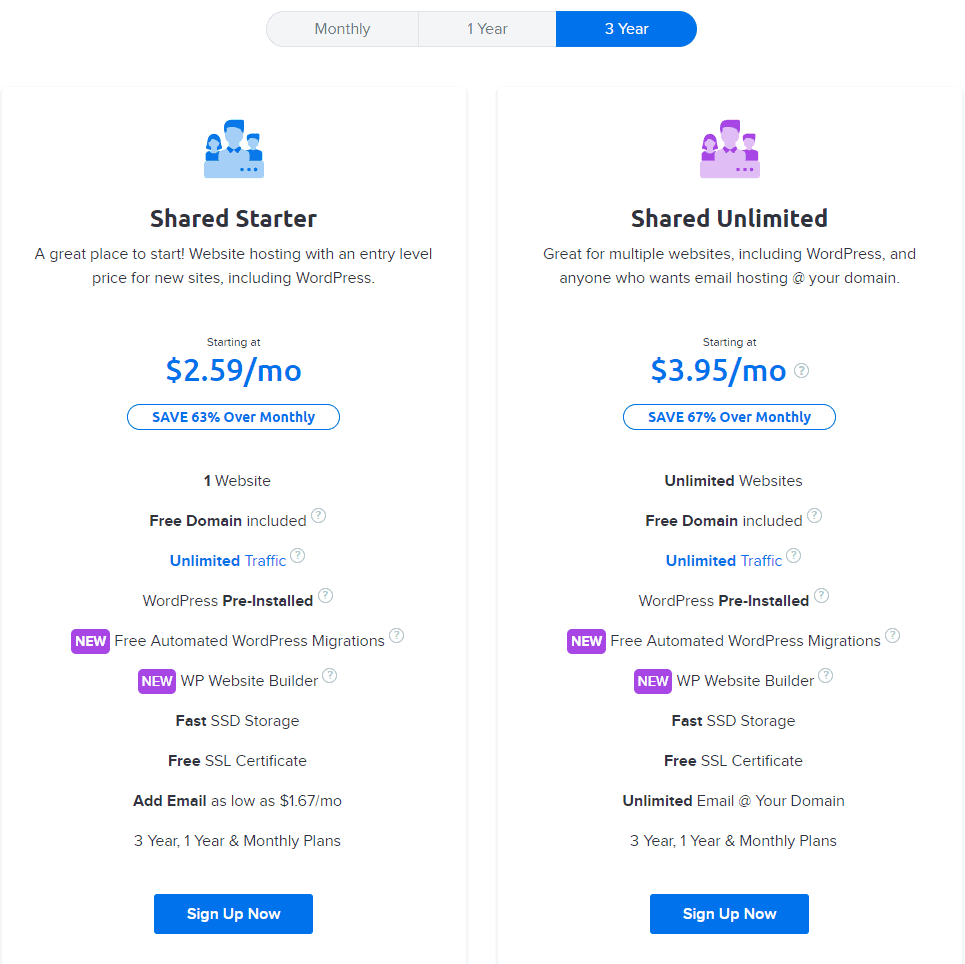
    The hosting plans offered by DreamHost are reliable and flexible. It offers Shared hosting with virtual private server hosting. It offers Dedicated server hosting with domain name support. The company offers a special website builder option, so you’ll be able to add customized tools on your site.

    DreamHost offers a free automated WordPress migration option. WordPress integration feature helps blog sites or new developers working on CMS platforms. The company also offers monthly web hosting plans for a limited budget.  

    Verdict: Bluehost offers a range of hosting solutions, so its a winner here.
    Top

    3. Bluehost vs DreamHost Review – Hosting Features Offered

    Hosting Features Offered by Bluehost

    Bluehost offers unlimited bandwidth and disk storage on most web hosting plans. It offers drag & drop site builder that helps to customize your website. It offers a free domain name with email accounts and also offers add-on domains with complete cPanel support.

    It offers FTP access with the web file manager. It supports various databases that include MySQL and PHP. Dual quad processor servers power most hosting plans of the company. Bluehost also offers eCommerce features that include SSL secure server, shopping carts, encryption features etc.

    Bluehost offers one-click WordPress installation and other open-source platforms. WordPress integration will allow you to use free themes, plugins, and tools by the company.

    The hosting company offers an uptime guarantee of more than 99.98%. It offers easy to use dashboard that lets you control all the features from a single place. It offers a full suite of tools, so you can choose from the best tools to customize your site.  

    Plus, it makes available Bluehost domain coupon, which makes buying a domain for your website cheaper.

    Hosting Features Offered by DreamHost

    DreamHost offers unlimited bandwidth and email support. It offers free storage with a free domain for the first year of buying the plan. It offers easy to use control panel that supports let’s encrypt feature with forwarding domains. It provides access to complete privacy protection along with regular updates for the site.

    DreamHost offers easy integration with WordPress. You’ll be able to access drag and drop feature and more than 200 starter site templates. The one-click installation support saves your time and effort both.

    If you already have a WordPress site, then it will be an added advantage. The hosting company offers the MySQL database with full CGI access. With the optimized servers of the hosting company, you’ll get complete reliability and speed. It also offers resource protection and solid-state storage.

    DreamHost hosting company offers an uptime guarantee of 100%. If your site’s uptime performance is good, your site will be live for more time. This means your site will get good exposure in the web space. DreamHost offers great starter pack features for a new website.  

    Verdict: Bluehost offers wide-ranging features on hosting plans, so it has an upper edge. It wins here.
    Top

    4. Bluehost Vs DreamHost - Security Features Offered

    Security Features Offered by Bluehost

    Security Features

    Bluehost excels in security features and offer three-layer anti-spam protection that includes SpamExperts, Apache SpamAssassin and Spam Hammer. It offers complete inbox protection with easy to use filters and helps to remove all malicious files and updates all applications.

    The security features let you change passwords and hides your configured files. It also updates all plugins to new versions and lets you delete database or corrupt files from the site.

    Security Features Offered by DreamHost

    DreamHost offers a malware removal scanner that removes malware and also prevents your site from malware attack. It offers complete domain privacy features that you can choose according to the hosting plan. It offers let’s encrypt feature with ModSecurity and offers SSL certificates that are included with most hosting plans.

    DreamHost also updates your files and databases of the website, so you don’t have to manually update it. The security features keep your website safe and protected. 

    Verdict: Bluehost offers three-tier security as compared to DreamHost, so its a clear winner here.
    Top

    5. Bluehost Vs DreamHost Review – Customer Support

    Bluehost Customer support

    The hosting company offers 24/7 customer support that includes phone, chat, and email. The live chat feature helps you to get a quick fix for all your website related issues. Along with quick and responsive customer support, Bluehost also offers a complete knowledge base system that gives you expertise about working on the site.

    DreamHost Customer support

    Customer Support

    DreamHost offers 24/7 phone, email, and live chat support. The hosting company also offers forum support and a knowledge base that’ll give you more insight into web hosting. 

    Verdict: Both the companies offer excellent customer support, so both are winners here.
    Top
     

    6. Bluehost India Vs DreamHost - Payment Options

    Bluehost Payment Options

    Payment Option

    Bluehost accepts many forms of payment modes that include major credit and debit cards. The company also accepts purchase orders and money orders. It accepts different offline payment modes on the mailing address and also accepts PayPal.

    DreamHost Payment Options

    The company accepts all modes of payments including major credit/debit cards. It accepts electronic cheque and PayPal. DreamHost also accepts gift certificates and money orders. Though, some international prepaid cards are not accepted by the company due to limitations.

    Verdict: Bluehost offers great payment options, so it is a clear winner here.
    Top

    7. Bluehost vs DreamHost – Money-Back Guarantee

    Bluehost Money-Back Guarantee

    Bluehost hosting company offers 30 days money-back guarantee on most hosting plans. This does not apply to add-on products or domains. You need to apply for a refund within 30 days after which it won’t be initiated.  

    DreamHost Money-Back Guarantee

    Money-Back Guarantee

    For Shared Hosting, DreamHost offers a refund policy of 97 days. And, for all other hosting plans, the refund is up to 30 days. You can apply for a refund within 30 days from the date of purchase.  

    Verdict: DreamHost wins here.
    Top

    To sum up;

    Bluehost offers competent hosting solutions for small and large business organizations along with Bluehost coupon. It also offers excellent customer support with great integration tools.

    DreamHost is a popular hosting company that offers affordable hosting plans and is ideal for startups or if you need to expand your business.

    In Bluehost vs DreamHost India review, Bluehost seems to be the clear winner as it’ll help to grow your presence online and also give you good exposure in the web space.

    • « Previous Page
    • 1
    • …
    • 5
    • 6
    • 7
    • 8
    • 9
    • 10
    • Next Page »

    DMCA
    PROTECTED


    Back to Top

    © Copyright 2026 BHICoupons.in · All Rights Reserved · All Logos & Trademark Belongs To Their Respective Owners·

    Bluehost Coupon