BhiCoupons.com

  • Home
  • Reviews
  • Blog
You are here: Home / Archives for Blog

How to Create an Effective Content Strategy for a Website?

By Sudhir Bhushan Leave a Comment

Create an Effective Content Strategy In the digital world, high-quality content has become synonymous with enhanced user experience. A strong content strategy is not a preference anymore, it is the most important requirement.

If your website content is not interesting or engaging, it’ll affect your site’s ranking and, of course, website traffic. Therefore, every piece of content on your site must be informative and relevant to the users. Effective website content is always structured and well-planned. Additionally, your content must create a strong impression and persuade your customers to take the desired action.

Read: 9 Important SEO Metrics to Track (How to Improve Them)

  • How do you create an effective content strategy?
  • A. Importance of Content Creation Strategy

  • B. How to Create an Effective Content Strategy?
  • The right content strategy,

How do you create an effective content strategy?

A content strategy includes planning, execution, and promotion of content to achieve a marketing goal. Depending on your marketing goals – brand awareness, increased sales, or generating leads, you can tweak your content strategy accordingly. The main steps for creating a content strategy includes setting goals, determining your target audience, competitor analysis, keyword research, content types, editorial calendar, and publishing.

Top

A. Importance of Content Creation Strategy

Content Creation Strategy

In the absence of content strategy, you might end up publishing random content on your blog or website. This will affect your marketing campaign and audience engagement. Thus, having a content strategy is important, as it offers benefits like:

  • Improved organic website traffic
  • Link building opportunities that help in ranking
  • Flexibility to experiment with different marketing tactics
  • Streamlining the content to focus on user-orientated goals
  • Enhance brand awareness

A content strategy helps you identify different blog topics and themes that resonate with your audience. It helps you garner maximum traction online. Plus, it helps you maintain the right consistency and flow of updated content on your website.

Why is Bluehost the best web hosting company in India? Read this Bluehost review to find out!

Top

B. How to Create an Effective Content Strategy?

1. Define your goal and run a content audit

Define your goal

Do you have a goal in mind for creating a content marketing strategy? If you aren’t aware of your goals, you can’t scale higher. Having a marketing goal ensures that you do what you intend to. Start by defining your goals, or list your goals before working on a specific marketing plan.

Also, most brands start with blog posts as a part of content optimisation. But, first, you need to run a content audit.

  • A content audit will review your site for top-performing and low-performing content. It gives you a fair idea about the content your audience will love. Based on the content, you align the goal of your company.
  • Figure out what content you’ll create in the upcoming months and years. The content you curate should resonate with your audience for it to have an impact.

2. Determine the type of content you want to create

The content you create for your website should be engaging and at par with your competitors. There are five main types of content – blogs, call to action, landing page, audio and visual.

  • Blogs give you the right opportunity to connect and make a space on the web. Create informative blogs that cover the basics of your services and products. Here, long-form content garners better traction than short form content.
  • Call to action content focuses on selling a product or promoting your website. You can subtly create this. Your article should promote a product/service, but indirectly.
  • Landing pages are goal-oriented pages; they help generate potential leads.
  • In visual content, you can use images, GIFS, and infographics.
  • Audio content can engage our viewers without leaving the page, thus increasing conversions.

3. Plan and draft web pages

When building a website, some of the important pages that you require include homepage, contact us page, about us page, product category, service page, careers page, and testimonial page. If you need to start a blog, plan a blog page and the content you will add to your blog. Proper planning of web pages is essential for a strong content strategy.

Make use of these Bluehost coupons to buy web hosting for your website.

4. Set the tone for each page

Set the tone for each page

Some websites are too promotional or sales in their content strategy, while others focus on engaging, well-optimised content. The tone you set for your content helps you connect with your target audience. With a clear content strategy, you can persuade your audience and leave an impression. Mostly, a casual tone resonates with readers, providing an idea for the desired action without being too formal.

5. Brainstorm content ideas

Brainstorm content ideas

It’s time you brainstorm different content ideas to make the right impact on customers or users. You will need to let your creative juices flow and work on different content types. Some tools to help you with content ideas for your website are:

  • BuzzSumo is a popular research tool that offers insight into social media content trends.
  • Feedly is another effective tool that tracks trending topics in your domain, so you can get good content ideas.
  • BlogAbout lets you generate ideas that may interest your target audience.

6. Sync website content with design

The design and content should sync while you develop a content strategy. Your web design must be simple, so your content is highlighted and reaches the right customer base. Besides, the correct layout and content may attract more people to your website. The content you add to your website must be relevant and readable.

  • If your content is cluttered or unreadable, it may affect the site’s ranking.
  • Bulleted content or infographic style of content has a positive impact on readers
  • Also, your website interface must be simple so that customers get the best user experience.

7. Publish, manage and update content

Once your content strategy is ready, it is time to go live. You can use an editorial calendar for publishing your content. Additionally, it is essential to manage your content according to the site’s requirements.

  • Apart from publishing new content, also update older content.
  • Remove thin pages that don’t offer any value.
  • Write meta tags for all blogs and web pages.
Top

The right content strategy,

Content strategy plays a significant role in the success of your website. With a proper content strategy in place, you can see a difference in your site’s traffic and ranking. It can also help reduce the bounce rate. High-quality content is also the driving force behind all marketing campaigns – SEO, social media, and paid ads. So, make the most of these tips mentioned here and get started with creating a content strategy today!

How to Build an E-Com Website with Bluehost Website Builder?

By Sudhir Bhushan Leave a Comment

How to Build an E-Com Website with Bluehost Website Builder? During the pandemic, most companies realized the importance of a website.
When the lockdown lifted, businesses with an interactive website could revert to some sort of normalcy. But, the ones without a website were under tremendous pressure.

In these vulnerable times, it is essential to stay connected to your customers, and this is where a website helps.

Thanks to tools like the Bluehost website builder tool, building a website isn’t a task anymore. With this tool, building your E-com website is simple as you don’t require any technical or coding skills.

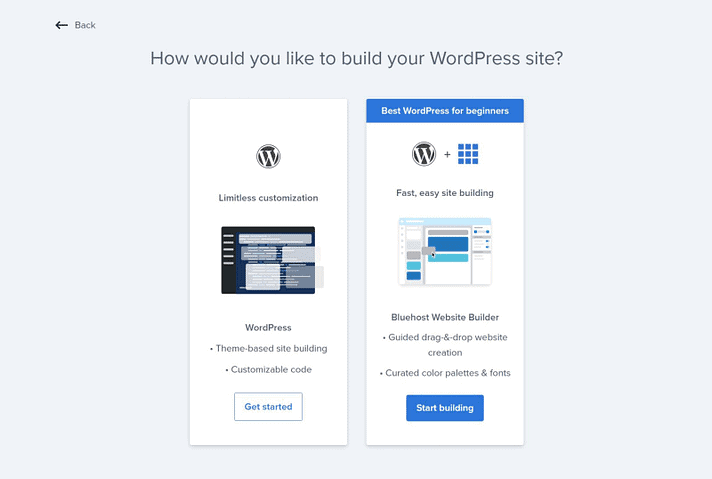
  • It offers AI technology and drag & drop features that let you create your E-com website, add products, and sell them online.
  • Besides, it lets you integrate with different payment platforms, so you don’t require added installations.

In the below article, we’ll look at the steps to build a business website (E-com).

Further reading: How to Purchase a Domain Name and Hosting With Bluehost

  • What is the Bluehost Website Builder Tool?
  • A. How to Build an E-Com Website with Bluehost Website Builder
  • Step 1: Select a Plan and Purchase Domain & Hosting
  • Step 2: Login to Your Bluehost Account
  • Step 3: Use Smart Website Building Page
  • Step 4: Fill in the Queries
  • Step 5: Add Cover Image and Logo
  • Step 6: Font and Colour Scheme
  • Step 7: Website Navigation
  • Step 8: Add Contact Information
  • Step 9: Add Products
  • Step 10: Payment and Other Features
  • Change starts with the right website builder tool,

What is the Bluehost Website Builder Tool?

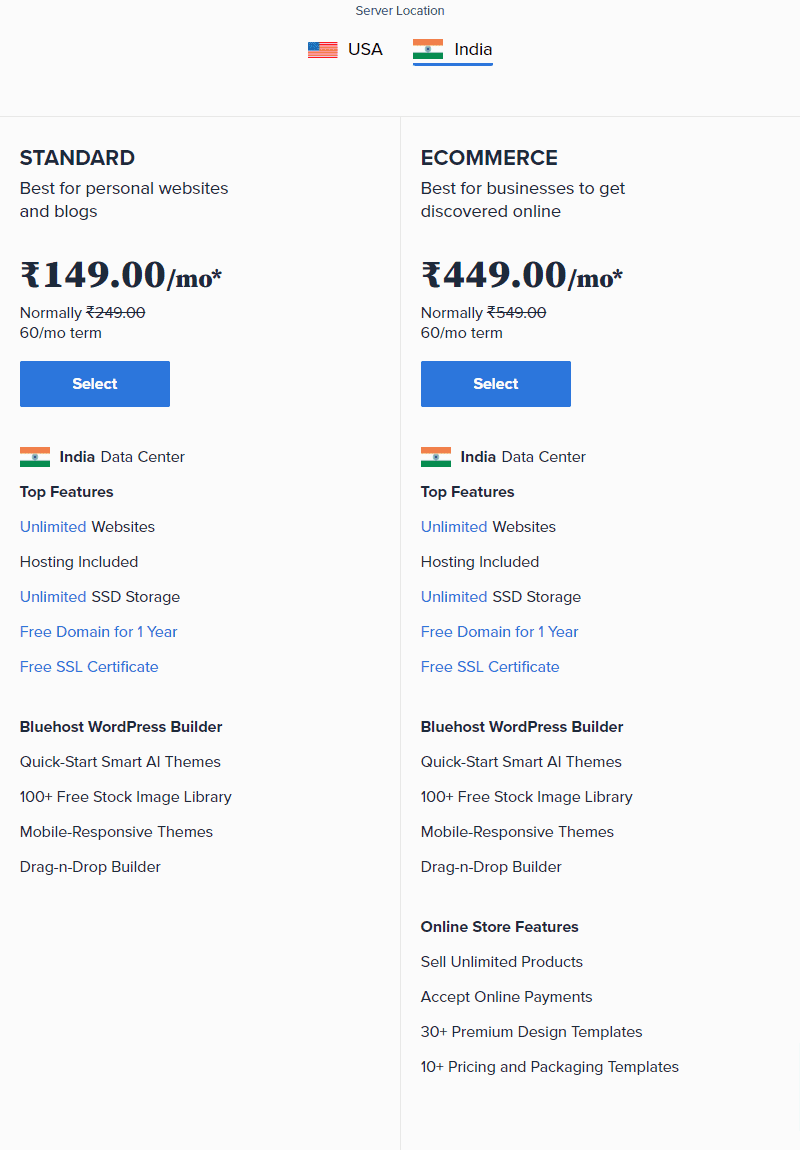
Bluehost Website Builder is an excellent tool for everyone who wants to build a professional-looking WordPress website. You require no coding or technical knowledge to use this website creation tool. The standard website builder plan is ideal for personal websites and blogs, while the eCommerce plan can help you set up an online store. Both plans offer a free domain name (for 1-year) and a free SSL certificate. Some of its features include mobile-responsive smart AI themes, a free stock image library, drag & drop builder, among others.

Top

A. How to Build an E-Com Website with Bluehost Website Builder

Step 1: Select a Plan and Purchase Domain & Hosting

Select a Plan and Purchase Domain & Hosting

Head to the Bluehost website page builder and choose your location and plan. Once you select a plan, you will be redirected to the domain registration page.

Here, enter the domain name or register a new one (the domain name is free with the hosting package). Next, purchase a suitable web hosting plan to build a site. Use Bluehost Coupons to buy a web hosting package.

Top

Step 2: Login to Your Bluehost Account

Login to Your Bluehost Account

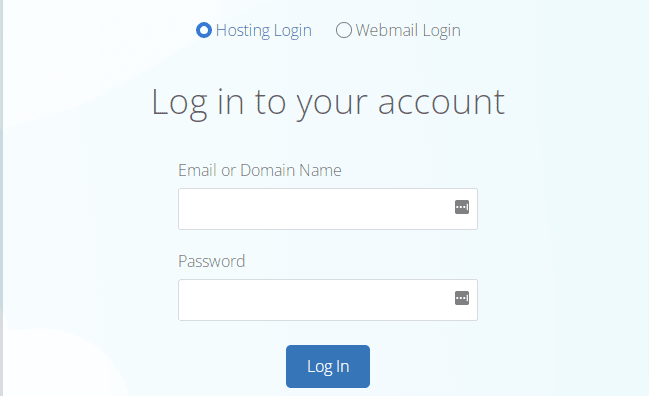
Once you purchase the website builder plan, it is time to use your credentials to log in to your Bluehost account. After entering your login credentials, you will be redirected to the Bluehost cPanel dashboard.

Top

Step 3: Use Smart Website Building Page

Use Smart Website Building Page

If you have no idea about building a website, the site will redirect you to a ‘smart’ website building page. Here, you have the option of creating a website for E-com-powered website.

Top

Step 4: Fill in the Queries

Fill in the Queries

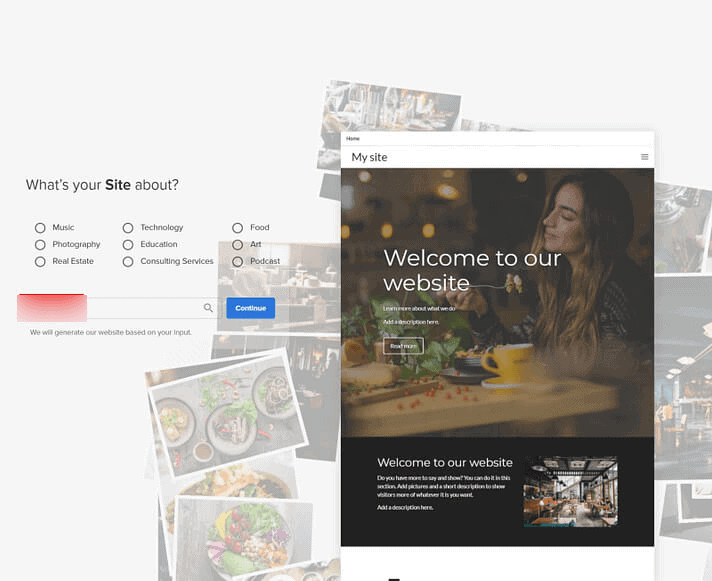
Now, the Smart AI option in the builder tool will ask you some questions related to your site. Based on your experience, you can select an option and continue. Here, you can click the start building option to create your WordPress-powered E-com website with the help of Bluehost website builder.

Furthermore, answer all questions. Select ‘your site option’, and if it is not available, search with the right keyword. Enter the name of your website when promoted. For example, you can name your site – ‘The Ideal Shop.’ Now, click on ‘Continue’.

Top

Step 5: Add Cover Image and Logo

It’s time to add a cover image for your site. Upload an image from your system or choose from the stock photos on the website builder tool. Once you select a cover image, click on continue. Generally, a website cover image is automatically selected based on the keyword you choose. Now, upload your logo. Once the logo is added, click ‘proceed’.

Top

Step 6: Font and Colour Scheme

It’s time to select the display font for your website. Bluehost website builder tool offers many fonts, so choose the one appropriate for your site. Click on the font style and continue with the process. Colour scheme plays a vital part in a website. Here, it is divided into two parts – brand colours and content style. You can choose a colour scheme based on the brand logo and continue to the next step.

Top

Step 7: Website Navigation

After you select a suitable colour scheme, choose a navigation style. Here, you will have an option of five different styles. Choose a style that complements your site and proceed to the next step.

Top

Step 8: Add Contact Information

It is time to add relevant contact information to the footer section of your website. After which, add all details and click Finish to complete the whole site setup. Once your setup is complete, the page will redirect you to the website builder dashboard. This process may take a longer time, so have patience.

Top

Step 9: Add Products

Once your site is ready, the tool will redirect you to the Bluehost website builder backend. Here, make changes to your site and add products you wish to sell.

Click add a section to add products to your home page. Or else, you can create a brand new page where you can add products. Click on menus or pages to add a new page.

Select relevant details and describe your page. Once your page is added – add new products – check on the product option to get started. Moreover, you can choose the drag & drop feature for product placement, and edit the elements on the right side of the bar based on your choice.

Top

Step 10: Payment and Other Features

Add the payment option with the product display. Here, you have the PayPal option. Edit the PayPal section with the drag and drop design feature.

Next, change the name of the store by clicking on menus and settings. Once you design your online store, check-in the preview section to see how your website appears. After examining the display on mobile and desktop, click ‘Publish’.

Apart from this, the website builder tool lets you add a blog, email section, marketing, and social media buttons. Moreover, site management is simple with the Bluehost dashboard option. Use the ‘my sites’ tab and click on ‘manage my sites’ to modify changes.

Further reading: Web Hosting vs Domain Name

Top

Change starts with the right website builder tool,

With the Bluehost WordPress website builder tool, you can also build a WordPress site in no time. This tool allows you to create highly functional sites in minutes using AI technology and an intuitive interface.


  • With the quick-start templates, you can choose templates faster than you think.
  • The real-time editing feature allows you to edit your business website pages without codes.
  • Designing a website with AI features makes sure that your site looks great on mobile and desktop platforms.

The tool lets you build a site that grows as your business expands, leveraging the full capacity. It offers great features like mobile-ready templates, simple editing, stock image library, customized CSS, custom fonts, and unlimited product uploads.

A Bluehost website builder is an essential tool to create a professional-looking site, regardless of your business needs. Lastly, it lets you upgrade from a standard plan to a feature-rich plan to help your website grow.

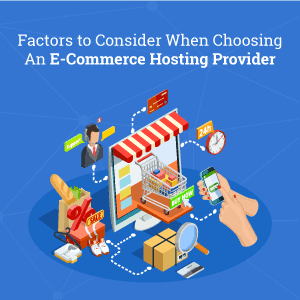
7 Factors to Consider When Choosing An eCommerce Hosting Provider

By Sudhir Bhushan Leave a Comment

eCommerce Hosting Provider Most people prefer shopping online because of the ease the E-com platform offers. Moreover, over the years, the E-com industry has been growing rapidly. Following this, every retailer needs to build a scalable and user-friendly eCommerce website.


eCommerce hosting plays a critical role in launching a new website and providing the best experience to users every day. Poor loading speed and lack of security features can affect your E-com website’s traffic. Plus, if your E-com site is managed poorly, it could affect the bottom line.

Further reading: Web Hosting Mistakes You Should Avoid

  • What to look for when selecting an eCommerce hosting for your online store?
  • A. What is eCommerce Hosting?
  • B. Factors to Consider When Selecting An eCommerce Hosting Provider
  • Choose the Most Reliable E-com Platform,

What to look for when selecting an eCommerce hosting for your online store?

When it comes to eCommerce hosting, security should be given top priority, followed by website speed. Make sure the resources available with the hosting is scalable and can handle a huge surge in traffic. Automatic backup is another important consideration. So is excellent customer support. These are a few factors that can help enhance the performance of your eCommerce website. Besides hosting, make sure your website is well-optimized and well-maintained.

Top

A. What is eCommerce Hosting?

Similar to web hosting, eCommerce hosting is a hosting package designed specifically for eCommerce sites. The hosting supports all features and requirements to run a successful online store. In short, eCommerce hosting comes with exceptional tools designed for E-com websites.

The features might include security, payment integrations, SSL encryption, and scaling of resources to accommodate high traffic. There are many options available to build an eCommerce site like Shopify, BigCommerce, Big Cartel, and WooCommerce. Picking from among them can be a tough choice. However, when it comes to eCommerce hosting, the following are the factors you need to consider.

Read this Bluehost review to know why Bluehost India is the best hosting for eCommerce.

Top

B. Factors to Consider When Selecting An eCommerce Hosting Provider

1. Scalable Resources

An eCommerce website can’t do without the scalability feature. As sales, discounts, promotional campaigns can affect website traffic, your web hosting should be able to handle the surge in traffic. The hosting plan you choose should allow you to scale resources to accommodate a sudden spike.

  • Your E-com host should let you add RAM, CPU, and other resources you need for managing the surge.
  • eCommerce hosting packages are available with Cloud hosting and offer the best solution to traffic surges. Cloud hosting lets you scale resources automatically on a surge, so you don’t have to look after your website manually.
  • Plus, Cloud hosting uses only relevant resources when needed, which saves on costs.

Furthermore, it is essential to maximize CPU resources and usage if you expect higher site traffic. An E-com hosting plan that takes care of all these needs will give you good results in the long run.

Make use of these Bluehost hosting coupons to purchase eCommerce hosting now!

2. Uptime Guarantee and Bandwidth

Uptime Guarantee and Bandwidth

The E-com hosting package you choose must offer you an uptime guarantee of more than 99.99%. Besides, if your website takes too long to load, the customers won’t return to your site. That’s why Shared hosting is not preferred for an eCommerce site as there could be frequent downtime. Look out for a plan that features uptime monitoring, so you are notified of server issues.

eCommerce websites take up a lot of file space, so you need to have enough resources unless you wish to pay overage fees. In addition, eCommerce websites, in particular, tend to store images of products. Multiple high-resolution images will require more bandwidth and storage, so go with a plan that offers both of these features.

Further reading: Shared hosting vs VPS hosting

3. Security Features

Security Features

A customer who makes payment on the eCommerce website expects complete encrypted security, so their credit and debit card information is secure. Following this, you need to ensure your website is encrypted with SSL or HTTPS for secure checkout.

  • Make sure the hosting platform you choose is payment card industry compliant.
  • Your E-com hosting provider must also provide you with advanced security features like malware scan, SSL certificates, and firewall protection.
  • Make sure you choose a plan that offers prevention from DDOS attacks and hacking.

Security flaws can allow the entry of malicious files on your website. That’s why you need to choose a host with complete E-com security solutions.

To purchase an SSL certificate for your website, use these Bluehost Coupons.

4. Integrations

Integrations

Yet another factor that you need to consider is the eCommerce integration feature. An E-com hosting provider can provide you with many tools that will help to run your website. However, while looking for this feature, it is essential to look for the tools you’ll need for your store.

  • An email integration tool can help you connect with your potential customers, an accounting plugin will help with sales and bills, and other apps can help with product shipping.
  • Additionally, your E-com hosting provider should allow you to integrate with popular payment platforms. Your E-com site should integrate with debit cards, credit cards, UPI’s, cash on delivery, and bank transfers.

For example, Bluehost allows direct Razorpay integration with all the E-com integrated stores for easy access. In addition, E-com hosting companies must comply with PCI.

5. High Performance

High Performance

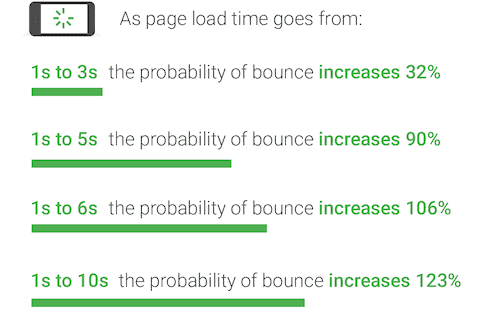
It is essential to find an E-com host that provides fast and reliable services. More than 55% of consumers will abandon a site that does not load in three seconds. Most new E-com websites choose Shared hosting, but it’s slow and has frequent downtime that affects your rankings. Also, some hosts have unreliable infrastructure, so you will have to be careful with your choice.

Consider CDN as a significant factor while choosing an eCommerce hosting platform. As CDN’s are a set-up of servers spread across a wide area, it provides high performance.

Besides, a host that provides a CDN feature ensures that your loading time is faster than other websites. Moreover, your E-com host should include uptime monitoring and performance report in the plan you choose.

Further reading: How To Setup Free Cloudflare CDN For Your WordPress

6. Automatic Backups and Mobile-friendliness

You need to protect your site data and files with the data backup feature. You need to buy an E-com hosting plan that provides complete data backup solutions.

With the slight changes you make on your website, your site data can corrupt. Therefore, it is essential to have data backups to restore the site settings of the corrupted files. Without recent backups, it might be tricky to restore your E-com website.

Additionally, automatic data backups play a crucial role in your website security. If there is a possible hack attack on your website, you won’t lose important data. Today, most people use a mobile device for shopping, so it is essential to look for E-com hosting providers that allow purchasing on a mobile device. Mobile-friendliness is the main criterion for these purchases. 

7. Customer Support

Customer Support

All sites face issues or errors, so it is essential to look for a host that provides 24/7 support. The support should be friendly and fast, so your site does not suffer downtime. In addition, your hosting provider must be reachable when in need to provide you with the right solution.

Whether you need to scale resources or need help in security, your E-com host should provide you with reliable support. Besides, identifying the issues at the right time will ensure your website is always up and performing.

Also, check for customer support reviews when you buy a plan.

Top

Choose the Most Reliable E-com Platform,

Starting a new E-com website can be challenging, especially with many competitors. That’s why choosing a reliable E-com platform is essential alongside high-performing eCommerce web hosting.

Also, while looking for an E-com platform, pick a host that’s ready to scale according to your business needs. Do your research and spend time looking for hosting plans that match your requirements. Once sure, make a purchase right away.

What features do you look for in E-com platforms? Do let us know!

What is The Difference Between .COM and .NET? 2023

By Sudhir Bhushan Leave a Comment

Difference Between .COM and .NET

Choosing the right domain name extension is crucial for your brand and business. Besides providing an identity to your business, it can also influence your search rankings. Part of building a successful website is deciding on the right domain name extension.

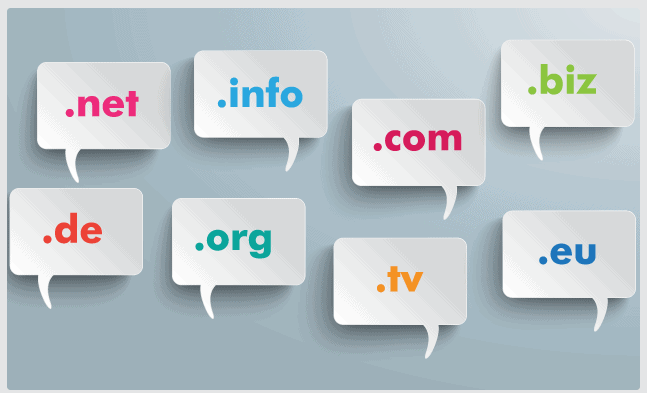
Though there are many options, most people stick to .COM or .NET because of their popularity. Both .COM and .NET are recognizable domain extensions, easily available with hosting companies.

Choosing the right domain extension is essential as it reflects the purpose of your site. But how will you know the difference between .COM and .NET? In this article, we will talk about the difference between .COM and .NET, so you’ll know which one to choose for your website.

Read: Difference between a domain and web hosting.

  • Which is better – .COM or .NET?
  • 1. What is a Domain Name Extension?
  • 2. Definition of .COM and .NET Extensions
  • 3. When should you consider a .COM or a .NET Extension?
  • 4. .COM vs .NET – Which to Choose?
  • 5. Pros and Cons of .COM and .NET Extensions
  • 6. .COM vs .NET: Which One is Better For SEO?
  • Verdict,

Which is better – .COM or .NET?

While choosing the extension name, consider the reason to choose .COM or .NET. More than 43% of domains have a .COM extension, so it is the first choice for any new website. If you decide to go for a domain name extension other than .COM, make sure to look at your content. Most technology-related sites choose .NET as the name extension. Also, avoid niche domain extensions .CLUB .SPACE as these extensions are not suitable for commercial business. Lastly, consider the price while buying a domain name extension.

Top

1. What is a Domain Name Extension?

Domain Name Extension

Domain name extensions have two main parts – top-level domains and second-level domains. A top-level domain comes after a .period such as .NET or .COM. On the other hand, the second-level domain precedes the period. For example: in bhicoupons.com, the SLD is bhicoupons.

Domain name extension is a part of your domain name. The top-level domain extension helps you to identify the category of your site. Currently, there are more than five thousand top-level domains to register from, and the number is increasing each day.

To purchase a domain name extension, make use of Bluehost domain coupons.

Top

2. Definition of .COM and .NET Extensions

2.1 Meaning of .COM Extension

.COM Extension

.COM is the most popular domain extension used by the majority of websites on the internet. .COM is a shorter version of the word ‘commercial’ and is a top-level extension (TLD).
 
When it was first introduced, .COM was used only for commercial websites, but today it represents all websites – personal, business websites, blogs, and portfolio sites.

Most people see .COM as a default domain extension because of the ubiquity it offers. However, as .COM serves over half of the websites on the internet, it scores low on availability. For a new website, getting a .COM domain name extension is tricky.

2.2 Meaning of .NET Extension

.NET Extension

.NET domain name extension is the most popular name extension after .COM. .NET is a shorter version of ‘network’ and indicates that the name represents websites involved in networking technologies.

Initially, it was meant for networking, ISP’s, email services, and database, but slowly it gained popularity for blogs and business websites. Most new businesses opt for .NET extension when the preferred .COM extension is unavailable.

Further reading: New Domain or Subdomain: Pros and Cons

Top

3. When should you consider a .COM or a .NET Extension?

3.1 .COM Extension

  • .COM extension is easier for people to remember and makes your website look professional.
  • Also, most mobile keypads have a .COM extension key for easy access.
  • Most users type the .COM extension in the address bar for finding a new website, so it increases your reach to potential customers.
  • Over the years, .COM extension has become a consistent marker for credibility and reliability.
  • Besides the recognition, it offers a professional seal in business.
  • Moreover, it is essential to check what your domain name represents and what you intend to do with your site.

3.2 .NET Extension

  • You can choose .NET extension if .COM is not available. Or you can consider the extension name for services like networking, database, email hosting, and internet.
  • Most businesses use the .NET name extension so that no other person can use it as a business name. The company mostly registers the name using .NET.
  • You can use the extension name for various speed-checking websites that allow internet users to check the speed in real-time.
  • Bigger brands buy both .COM and .NET extensions for their website so that nobody vilifies the reputation of their brand.
  • Domain name registrars and web hosting companies often present .NET as the first alternative to .COM. And most new websites register .NET and later migrate to .COM when it’s available.

Further reading: Biggest Web Hosting Mistakes To Avoid

Top

4. .COM vs .NET – Which to Choose?

4.1 .COM Extension

  • .COM is the most used extension that represents a business service or a product.
  • As a commercial domain, it is suitable for business platforms, E-com stores, blogs, personal websites, and general categories.
  • As per RFC 1591, .COM is meant for a commercial entity and is an ideal extension for common websites.
  • Through .COM, you can establish credibility for business as users prefer visiting a site with .COM.
  • Buying a .COM name extension is costly compared to .NET or other domains.

4.2 .NET Extension

  • Smaller companies can opt for a .NET name extension if they intend to provide information through their websites. As per RFC 1591, .NET is meant for only networking purposes.
  • Due to its easy availability, it also suits technology-related websites. Most tech companies use this extension as an alternative to .COM.
  • The best part about the .NET is its easy availability.
  • .NET will need more marketing efforts than .COM, as the latter is popular with search engines.
  • Though .NET name extension is a less competitive alternative to the .COM extension, it’s equally recognizable.
  • Although it wasn’t the first choice for generic websites before, it is far more preferred today as the demand for .COM is higher.
  • If you want a cheaper domain extension, then .NET is your best choice.
Top

5. Pros and Cons of .COM and .NET Extensions

5.1. Pros of .COM

  • Most companies prefer the .COM domain as its a known commercial extension compared to other domains.
  • Provides complete credibility and authenticity for business websites.
  • .COM has a dedicated support key in the mobile pad, which makes it easily accessible.
  • Establishes a strong online presence through search engine optimization.
  • Provides better ranking support than other domain name extensions.
  • Acceptable for a multitude of industries.

5.2 Cons of .COM

  • Half the internet is flooded with .COM extension, which makes it rather tricky to get the domain.
  • For non-profit websites, .COM may not be acceptable. It suits websites that are commercial or branded.
  • Usually, a more expensive option compared to .NET extension.
  • Finding an ideal domain name with a .COM extension may be time-consuming.

5.3 Pros of .NET

  • It is better for service-based business sites or technology related sites
  • An ideal option for networking and internet providers
  • Easier to get a new domain name compared to .COM
  • Helps in the marketing of service-based business websites
  • Professional and trusted name extension
  • Cheaper compared to .COM extension
  • Less competitive and registration process is hassle-free
  • Acceptable to use for any business-related website

5.4 Cons of .NET

  • .NET websites need comprehensive marketing efforts to rank on search engines or compete with similar websites.
  • For a business that is not established, users may find it hard to find your website.
  • With .NET, there is a possibility that users may land up on your competitor’s website.
  • .NET extension is limited to technology-related websites or networking sites, the extension thus does not have a universal appeal.
  • .NET may not work for commercial websites or E-com websites.
  • Not a professional sounding domain, so it may pose a problem in branding.
  • Not as competitive as .COM, but you can expect limited availability of domains.
  • Customised options may be costly.

#Alternatives Available to .COM and .NET

There are many other alternatives available to .COM and .NET. Most people also use customized name extensions for branding.

  • .ORG alternative is suitable for charitable organizations and non-profits.
  • Educational institutes use .EDU for credibility.
  • .GOV is used by most government departments and entities.
  • .IO is not too known, but tech companies or start-ups prefer it. Even call centers have .IO has a domain name extension.
  • Location-based extensions are common such as .UK .US or .IN. Location-based domains give access to websites that are located within a country.
Top

6. .COM vs .NET: Which One is Better For SEO?

.COM does not offer any built-in advantage over .NET from an SEO point of view. No matter which one you choose, search engines will treat them the same. That said, .COM TLD is a trusted name extension, and websites that use it, get more traffic.

Most users are aware of bigger brands use .COM. Moreover, .COM may get more site visits via search results.

At times, the choice of TLD may help you rank in the local results. For example, if your business is India-based and you go with .IN extension, your site might rank well in India and get more clicks.

For ranking a website, the focus should be on using the best SEO practices. SEO techniques use targeted content, which helps a site rank higher in SERP.

Irrespective of .COM or .NET, if you follow an SEO plan and optimize images, videos, and site content, it will make a difference. SEO works on targeting the right keywords and paying attention to the content you post. Here, an important part is the domain name and not the domain name extension.

Top

Verdict,

.COM is still the most preferred choice in domain name extension, but .NET is also picking up pace. If your preferred name extension is taken, you can add some additional words to make it unique.

Make sure your domain name is easily pronounced and keep it simple. Moreover, you can use a domain name generator tool for getting the specific domain. Whether it is .COM or .NET, the right selection will give you visibility and credibility in the webspace.

To buy hosting along with a domain name extension, use these Bluehost hosting coupons.

9 Important SEO Metrics to Track (How to Improve Them)

By Sudhir Bhushan Leave a Comment

Important SEO Metrics to Track

Digital marketing is vast and subjective to individual business needs. But, one of the best things about it is you can measure all parts of marketing strategies. Earlier, there were limited options available for digital marketers to track and improve SEO strategies.

But, with Google Analytics and other available tools, you can now know how your website is performing. SEO works on constant updates and new strategies. Besides, it needs to adhere to updated search engine policies that would require you to make changes to your website for better ranking.

SEO metrics allow you to measure the effectiveness of your SEO efforts and make changes based on the data available. In this article, we have compiled nine of the most important metrics that you need to track along with suggestions on how to improve them.

  • Which SEO Metrics Should You Track?
  • Important SEO Metrics to Track
  • 1. Click-through Rate (CTR)
  • 2. Organic Traffic
  • 3. Pages Per Session
  • 4. Exit Rate
  • 5. Average Page Load Time
  • 6. Backlinks Domains
  • 7. Core Web Vitals
  • 8. Pages Crawled Per Day
  • 9. Top Keywords Ranked
  • Track and Improve Through SEO Metrics,

Which SEO Metrics Should You Track?

CTR, organic traffic, page per session, exit rate, average page load time, backlinks domains, core web vitals, and top keywords are some of the SEO metrics that you need to track. Whether you want to know about site traffic, leads, or engagement, SEO metrics give you a comprehensive insight into how your site’s organic search strategy is performing. Besides, it provides you with insightful data that you require to formulate new strategies. To track SEO metrics, you can use different SEO tools. These will help you track and measure anything/everything related to your website.

Top

Important SEO Metrics to Track

1. Click-through Rate (CTR)

Click-through Rate

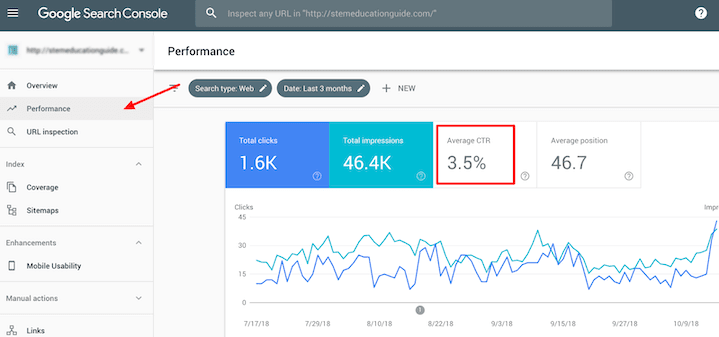
The click-through rate shows the percentage of users who visit your website after discovering your web pages in the search engine. For example, if 1000 searchers see your page listing in the search result, 100 people will click through your site. In addition, the organic CTR helps show your listing through URLs, titles, and meta descriptions. If the CTR of your page is low, it means your meta descriptions and meta titles are not engaging.

How to improve your CTR?

  • Monitor the click-through rate under the performance tab in Google Search Console. You can view CTR by page, device, or query. Monitoring the CTR by page will provide you with detailed insights.
  • Also, update your meta titles and descriptions. Make it more interesting and ensure they adhere to the required character count i.e. up to 60 for meta title and 130 to 150 for meta descriptions.
Top

2. Organic Traffic

Organic traffic is the foremost traffic you get from SERP without paying for ad placements. There is no one source for organic traffic; you can expect it from multiple sources like search engines, social networking websites, and direct searchers. Focusing on organic traffic shows your website search visibility. And, with a good SEO strategy, the number of visits will go up.

Track traffic through Google Analytics:

  • Log in to your Google Analytics dashboard → select add segment in the audience overview.
  • Here, select the organic traffic option-click to apply.
  • The tool will let you view the organic traffic as a percentage of total traffic.
Top

3. Pages Per Session

Pages Per Session is an essential on-site user engagement metric you can use for SEO. It indicates the number of pages users visit on an average basis before leaving your site. Also, the higher the page metric, the better it is.

To see Pages Per Session:

  • Log in to Google Analytics → go to the acquisition option → select all traffic and channels.
  • Here, you will get to see pages per traffic for each channel.

For lower metrics, it indicates your content is not engaging enough. In addition, if this metric is low, it also indicates your website is not user-friendly.

Top

4. Exit Rate

Exit Rate

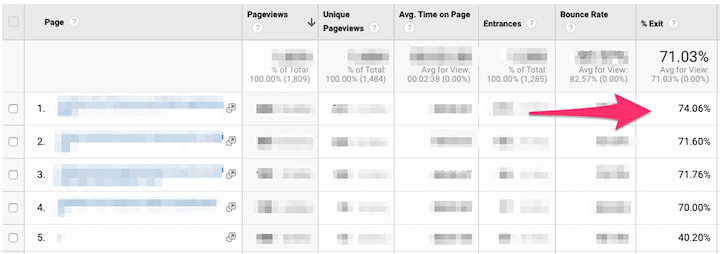
Exit pages are the last pages that the users browse through before leaving your site. Tracking exit pages (especially if you identify it is the same page) will help you understand whether or not the factors for exiting the site is related to poor usability, low-quality content, or other reasons.

Tracking of Exit Pages:

  • You can track exit percentage for individual web pages by heading over to Behaviour → Site content → All pages option.
  • To reduce the drop-off, ensure you have a proper site layout and engaging content.
  • Do include internal links and call-to-action to guide visitors to relevant pages on your site. Besides, it is vital to add high-quality multimedia content like images and videos to engage users.
Top

5. Average Page Load Time

Average Page Load Time

Website speed is a vital ranking factor that has the power to make or break your rankings on SERPs. The average load time is the time a website takes to display full content on the page.

Tracking of load time:

  • You can find this option under the behavior tab → site speed. Here, you will get to see the average load time for all pages.
  • It also lets you check load time for individual web pages and content loading.

Read: Web Hosting Mistakes You Should Avoid

Top

6. Backlinks Domains

Backlinks Domains

Backlinks are one of the most important ranking signals for Google. The number of backlinks includes all external source links that point to your website. Keep in mind that the quality of backlinks is more significant than quantity. For instance, ten links from authoritative and high-quality domains are more valuable than hundred links from low-quality domains.

Find about backlinks:

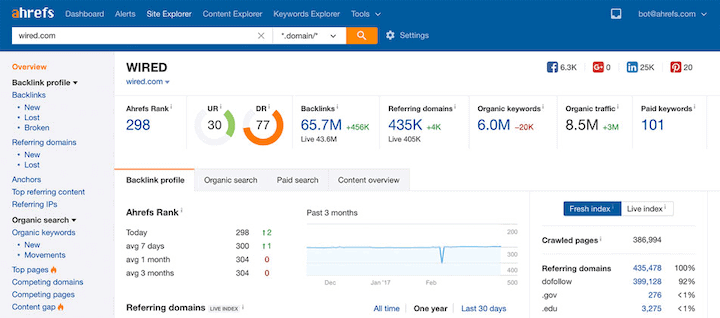
  • Ahrefs is the most popular SEO tool to track referring and backlinks domains.
  • With this tool, you can see the list of websites linking to your site, which pages they are linking to, and the domain ratings of websites.
Top

7. Core Web Vitals

Google has made a shift in focus and is rewarding websites with good rankings and good user experience. Traditional performance metrics like DOMcontentloaded and load time are easier to use, but they may not provide results. Also, focusing only on some pages can render poor UX. In 2020, Google introduced the Core Web Vital metrics that are more user-centric.

Three important Core Web Vitals:

  • The first input delay tells you about responsiveness and quantifies the user experience of the page.
  • Cumulative layout shift tells you about the visual stability and the number of unexpected layout shifts.
  • The largest contentful paint tells you about load speed.

Head to the enhancement section of the Google Search Console to see how your pages perform based on Core Web Vitals. Google Analytics will also help you access the above metrics.

Top

8. Pages Crawled Per Day

Pages Crawled Per Day

With the fast crawl rate, Google will index your site quickly. It improves your chances of ranking higher on SERP.

To use the pages crawled per day feature:

  • Log in to Google Search Console → settings → crawl stats. You can see how many pages Googlebot crawls per day. If you have many pages and only a small percentage gets crawled, it means there is some issue with crawling.
  • Tracking this metric won’t increase your ranking but will help with technical SEO.
Top

9. Top Keywords Ranked

Top Keywords Ranked

It is important to monitor how your site’s ranking for targeted keywords. When you know the rankings, it lets you focus on further optimising the keywords and target better ones.

Tracking keywords:

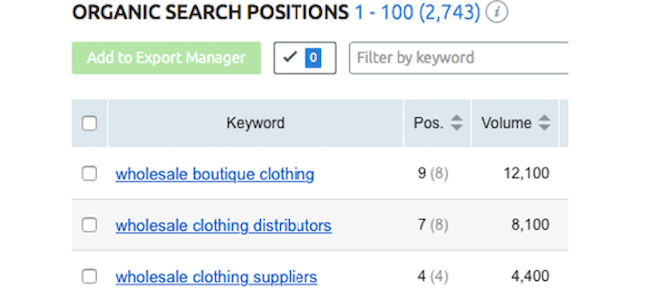
  • SEMrush tool can help you track keywords. The organic search position will also help you find relevant keywords for your site that ranks better.
  • Besides, you can see changes of keyword ranking over time, including how your search visibility improves.
Top

Track and Improve Through SEO Metrics,

Tracking SEO metrics should be a part of your SEO marketing strategy.

Are you tracking the SEO metrics mentioned above? With a few free tools available like Google Analytics and Search Console, you can easily track them.

Furthermore, if you want a comprehensive insight into SEO metrics, you can use paid tracking tools. SEO metrics point out issues and let you make improvisations. Also, once you are aware of what is causing site issues, rectifying them becomes easy.

Need web hosting services for your website? Use Bluehost coupons to get the best hosting for your site!

  • « Previous Page
  • 1
  • 2
  • 3
  • 4
  • 5
  • 6
  • …
  • 10
  • Next Page »

DMCA
PROTECTED


Back to Top

© Copyright 2026 BHICoupons.in · All Rights Reserved · All Logos & Trademark Belongs To Their Respective Owners·

Bluehost Coupon