BhiCoupons.com

  • Home
  • Reviews
  • Blog
You are here: Home / Archives for Blog

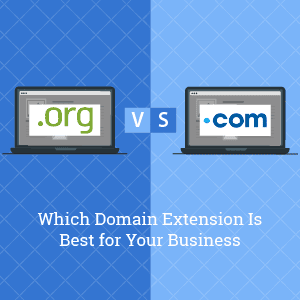
.Org vs .Com: Which Domain Extension Is Best for Your Business

By Sudhir Bhushan Leave a Comment

.Org vs .Com Although our website is ideally a blog, we did our research and chose a .Com extension instead of a .Blog.

It offers better visibility, is familiar to users, and is easy to remember.

It has all the hallmarks of a catchy domain name with a suitable domain extension.

Imagine if we switched it up and changed our domain extension from .COM to .ORG. Which one would you trust more?
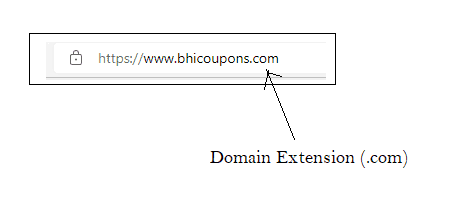
Domain Extension .COM

It’s a matter of perception. What you might see as a good choice for your brand may not always be accepted by the audience. For this, you have to learn the audience and their requirements. And find a domain name that’s credible and trustworthy.
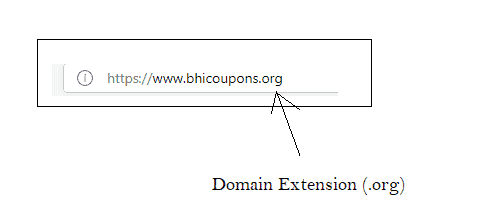
Domain Extension .ORG

In order to help you decide on the right domain, we have shared the difference between .ORG and .COM domain extensions.

Read: Web Hosting vs Domain Name

Verified 2 Hour(s) Ago
6157 Users Have Claimed This Offer!
Editor's Choice
62% OFF WEB HOSTING PLAN - LIMITED TIME OFFER!
CLICK HERE
Click to Get the Deal
Ending Soon. Hurry!
  • Just click to visit, the offer Applies Automatically.
  • Top Web Hosting Plan for Your Site
  • Free Domain + Free SSL + 62% Off Web Hosting.
  • Upto 75% Off on Shared & WordPress Hosting
read more read less
  • Which should you pick – .ORG OR .COM?
  • 1. Domain Extension .ORG
  • 2. Domain Extension .COM
  • 3. How does SEO affect websites with .Org and .Com Domain Extension?
  • Conclusion

Which should you pick – .ORG OR .COM?

While both .ORG and .COM are top-level domain extensions, when registering for either, you need to take into consideration the nature of your business. Websites with a .Com domain extension have a commercial intent, whereas .Org domain extension is mostly used by non-profit organisations. From an SEO perspective, a .Com domain has more weightage as most users are likely to enter .Com after a domain name, making it memorable. However, while registering, it is easier to get the domain of your choice with a .Org extension than a .Com extension as .Org domain extension is less competitive and more affordable.

Top

1. Domain Extension .ORG

1.1] What is the Domain Extension .Org used for?

Established in January 1985, .Org is a top-level domain. Initially, it was meant to be a domain extension for non-profit organisations and companies that wanted to purchase a domain but didn’t fall into any specific category, such as non-commercial, non-networking, non-university, non-government, and non-military. 

Other businesses weren’t allowed to use the .Org extension. But things have changed. In 2019, after the domain registry was sold to an investment firm, these restrictions were removed. And now, .Org is used by non-profit organisations and other industry standard groups.

People familiar with the domain extensions are more likely to believe that it is being used by a non-profit organisation. So, when you purchase a .Org domain extension for your business, ensure that you disclose the for-profit nature of your organisation to your audience. Otherwise, your organisation may face a fallout.

The .Org domain extension is short for ‘organisations’. Since it was established earlier than most of the other domain extensions, it is well-known and has more credibility. It is also considered more influential than the alternatives.
Get the best deal while purchasing a domain name with .Org extension by using Bluehost Coupons.

1.2] Advantages of owning a website with .ORG Domain Extension

  • Cost-Effective: Generally, domain names with .Com extensions cost more than the same domain name with .Org extensions. .Com’s popularity can certainly affect the prices of domain names, and you should factor this into your budget whether you are looking for a commercial or non-commercial domain name. The price could vary depending on the domain service provider you are using.
  • Less Competitive: Compared to .Com, .Org is far less competitive. It is easier to obtain your choice of domain name with .Org extension. Technically, it is much safer to purchase a top-level domain with more than one extension so that your competitors do not use them to steal your traffic.
  • Easy to Search Non-profit Domain: One of the positive impacts of .Org non-profit connotation is easy accessibility. Visitors, both old and new, will use .Org when searching for any non-profit they remember by name.

1.3] Disadvantages of owning a website with .ORG Domain Extension

  • No more reserved for non-profit: We have seen how the sale of the .Org extension to for-profit investment organisations has affected the domain extension. Now, commercial websites can use .Org extensions, but they do face a serious issue.

    People are used to associating .Org with non-profit organisations. So, it is prudent to be very clear about the nature of your organisation from the get-go as you don’t want to inadvertently end up misleading people, leaving you open to their censure.

  • Trust score or Authenticity: Since visitors prefer .Com over .Org for commercial websites, it has a better trust score. Any commercial business worth its grain of salt should consider getting a .Com domain. It is much easier to navigate and has fewer hurdles.
  • Highly Popular: Despite being an underused resource, you’ll still come up with a domain name and find that it is unavailable. So, you might have to come up with a list of names. This way, even if your first choice is taken, you can quickly move on to the next one on the list. You can always purchase it from the person who owns it, but it can get a bit expensive in some cases.

Read: New Domain or Subdomain – Pros and Cons of Each

Top

2. Domain Extension .COM

2.1] What is the Domain Extension .Com used for?

Although both .Com and .Org were established the same year, they share only a few similarities, such as being perceived as highly credible and influential domains.

  • The .Com domain stands for commercial.
  • It is one of the earliest established domains with high visibility.
  • It is most suitable for professional websites.

Initially, it was created for commercial use. But due to its popularity, several entities and individuals choose to purchase it. Most prefer .Com, even when many other specific domain extensions are more suitable for their website.

Based on W3Techs data obtained in March 2022, the .Com domain extension is used by 53.5% of all websites on the internet. That’s slightly more than half of the internet.

The popularity of the domain suggests that visitors prefer .Com and find it easier to remember. It is familiar to them. And in the world of technology, familiarity has power.

2.2] Advantages of owning a website with .Com Domain Extension

  • Mobile-Friendly: Due to its popularity, it is quicker to search for a domain with a .Com domain extension. Many mobile devices are equipped with keypads that have been modified for the newest technologies. It means tech such as a .Com button, which saves your visitors the trouble of typing it in.

    Of course, your tech-savvy visitors are more likely to bookmark your website or save the URL in a separate file for later use. Either way, there is no ignoring that .Com is more mobile-friendly.

  • Easily Searchable: Suppose you own a website sealionthebrand.com. Now, from your audience’s perspective, they are likely to enter .Com after your domain name instead of searching for sealionthebrand.org, sealionthebrand.in, sealionthebrand.info, or sealionthebrand.biz.

    All they have to do is remember your domain name. And they’ll automatically append .Com to the end of it.

  • Highly Credible: Most people treat .Org and .Com with the same level of trust. However, that’s not the case with other domain name extensions, such as .Info or .Biz.

    When people see a domain extension other than .Com, the first question they ask is, is this site legit? Because some of these domains are cheaper and easier to acquire, people tend to consider them low-quality or spammy websites.

  • Highly Suitable for all industries: Even though the .Com domain extension is supposed to be reserved for commercial websites, that doesn’t stop bloggers or other entities from using the .Com extension to build their platform. Thankfully, .Com is a good fit for several businesses and industries. It can also be used for several different niches.

Use Bluehost domain coupons to register a .Com domain today!

2.3] Disadvantages of owning a website with .Com Domain Extension

  • Expensive: It may be more prudent to make a list of domain names before you start finding a perfect domain name for your business. It will make the process easier, and if you are lucky, you might get a desired .Com domain name at an affordable price.

    Usually, the trending .Com domains are either taken or are very expensive. In such cases, you can try to find other domain names from your list.

  • Commercial Intent: Although a lot of people trust .Com domain names, there are few with technical knowledge who knows enough about them to be a little hesitant.

    They understand that .Com domain names are commercial websites created with the intent to sell something. It is one of the reasons why people are a bit sceptical about the authority of content posted on a .Com website.

Top

3. How does SEO affect websites with .Org and .Com Domain Extension?

Many experts, including Google’s Matt Cutts and John Mueller, have stated that the domain extensions have no bearing on a website’s ranking on Google Search Engine. Google focuses on providing users relevant results for their queries regardless of the domain extensions.

So, if you own an auction house, you can create a website with a .Auction domain extension. Similarly, an attorney can use a .Attorney domain extension to build his portfolio.

These domain extensions are easier to identify and remember as they serve a specific purpose. Regardless of which one you use, it may not affect the ranking of your website.

But you have to understand .Com should always be the first choice for a commercial website. If it isn’t available, you can move on to .Net or .Co. The domain extension .Org should only be used when the others are unavailable.

Ideally, it is better to purchase a new domain name rather than recycle another with a domain extension. A domain name that belongs to your brand can be trademarked so that no one else can use it.

Read: How to Purchase a Domain Name and Hosting With Bluehost

Top

Conclusion

The deciding factor between .Org and .Com is usually the website’s intent. If your website is a non-profit organisation or doesn’t fall within the traditional definition of .Com domains, you would have better luck with .Org domain extensions. But if you are building a commercial brand, then purchasing a .Com website is necessary.
8 Primary Differences Between Blogging and Vlogging

By Sudhir Bhushan Leave a Comment

Differences Between Blogging and Vlogging A great example of a blog is Bhicoupons.com – the blog you are currently reading.  Our blog focuses on sharing informative content written for a specific audience, primarily beginners interested in learning about the workings of the internet.

A typical blog focuses on text-based content, sharing a few multimedia elements whenever necessary. The multimedia elements may include short videos or embedded Vlogs.

Now, many of you are aware of YouTube. It is a premium Vlogging platform with the most reach. You’ll find many Vlogs on this platform. These Vlogs are mostly video-based content which can include images and text.

These are basic and easily identifiable differences between the two, we’ll see more in the following guide.

Verified 2 Hour(s) Ago
6157 Users Have Claimed This Offer!
Editor's Choice
62% OFF WEB HOSTING PLAN - LIMITED TIME OFFER!
CLICK HERE
Click to Get the Deal
Ending Soon. Hurry!
  • Just click to visit, the offer Applies Automatically.
  • Top Web Hosting Plan for Your Site
  • Free Domain + Free SSL + 62% Off Web Hosting.
  • Upto 75% Off on Shared & WordPress Hosting
read more read less
  • What is the difference between Blogging and Vlogging?
  • A. Blogging
  • B. Vlogging
  • #Difference Between Blogging and Vlogging

What is the difference between Blogging and Vlogging?

The main difference between blogging and vlogging is: that blogging is text-based (with some multimedia including videos), while vlogging is purely based on video content. Both have the same niche, such as travel, health and fitness, lifestyle, fashion, tech and cooking. To start blogging, you need to create a blog that requires hosting, domain and a website builder. To start vlogging, you just need to sign up on YouTube or Instagram, and you can start posting content. Cost-wise, vlogging is affordable as it’s almost free, except for purchasing equipment. Blogging, on the other hand, is also cost-effective depending on your chosen niche.

Top

A. Blogging

1. What is Blogging?

A blog, a short form of Weblog, is an informational website published on the internet. It usually follows a diary-style writing format with entries posted every few days or weeks depending on the blogger.

Today blogging is a very competitive hobby or business. It takes a lot of effort to rank a website on Google. If you don’t have a knack for writing things that Google finds relevant to their search queries, your blog will sit there gathering dust.  Due to this, a blog usually sees fewer visitors than a Vlog.

Someone once rightfully said ‘a picture is worth a thousand words’. A vlog is a collection of images that does a better job of engaging people. Compared to a Vlog, blogs get fewer visitors and less engagement, which is a primary difference between blogging and vlogging.

2. Blogging Niches

The internet is filled with several different types of blogging niches. It would take a long time to list all of those down. So, we’ll list a few key blogging niches. These are the few that are most popular amongst the readers. We’ll also share resources that list the other popular blogging niches.

Popular Blogging Niches

  • Health and Fitness blogs (Physical Health and Mental Health)
  • Fashion blogs (Women Centric, Men centric, Gender neutral)
  • Lifestyle blogs (Range of Different topics)
  • Travel blogs (Travel storiesand safari blogs)

Resources

  • 120 Profitable Blog Niche Ideas and How to Pick the Right One
  • How To Find Blog Niche Ideas In 2022- That You Will Not Regret Later
  • 100+ Best Blog Niches & How to Pick the Right One

3. History of Blogging

Although blogging has existed in some form since the invention of the internet, the term weblog came into being in December 1997 – coined by Jorn Barger.

  • A few years later, in 1999, Peter Merholz, then owner of the blog Peterme.com broke down the word weblog into two different words: We and blog. And that was just the beginning.
  • A few years later, the word blog was being used as a noun, and to blog became a verb. The year 1999 was terrific for blog usage!

If you are interested in learning a little more, refer to the history of blogging Wiki.

The origin of the blog is another primary blog and vlog difference. Blogs stepped foot in our world first. Today, we have more than dozens of blogging platforms packed with innovative features intending to break the mould and stand out.

4. Requirements to Start a Blog

We are going to share a list of things essential to start a blog:

  • A niche-centric ground-breaking blog idea. For example, consider the blog Foneacom by Varun Krishnan.
  • Purchase a Domain Name from a reputed domain service provider. For example, you can get adomain with Bluehost domain coupons.
  • Purchase a Hosting package from a reputed hosting service provider. As you can see, the screenshot above shows the last hosting+domain Bluehost dealfor WordPress. Keep an eye out for these Bluehost hosting offers in the future.
  • A blogging platform is a must. Unless you have website development skills and can build a design and upload it to the internet, you need the aid of a website builder or blogging platforms such as Blogger, WordPress, and Wix.

Resources

  • 18 Low Investment Startup Ideas in India
  • 45 Things to Know before starting a blog in 2022
  • Components of a Successful Blog
  • 13 Best Blogging Platforms in 2022. Which One is The Best for You?

5. Costs of Starting a Blog

The costs of starting a blog may vary from person to person based on their requirements. Some of you may already have the hardware, such as a computer or a laptop. So, that cuts hardware costs by a lot.

The average price of developing a website in India is 40 to 50K. But, if you decide to design a blog with free services, you might be able to narrow the budget to the website platform costs, hosting package, and domain prices.


Blog/Website Feature Approximate Monthly Cost (In INR)
Website Platform ₹0- ₹4,000
Hosting Package ₹0- ₹500/per month
Domain ₹920- ₹4,600
Apps & Integrations ₹0- ₹19,200
SEO & Marketing ₹700- ₹11,500
Hardware ₹0- ₹ 2 Lakh


Data Source: How Much Does Building a Blog Typically Cost

6. List of 6 Popular Blogging Platforms

  • WordPress
  • Blogger
  • Wix
  • Medium
  • Weebly
  • Tumblr

7. List of 7 Popular Indian Blogs

  • Shoutmeloud.com
  • Labnol.org
  • Nextbigwhat.com
  • Mouthshut.com
  • BloggersPassion.com
  • VegRecipesofIndia.com
  • Inditales.com

8. How to Monetise Blogs?

Once you have established a blog and posted plenty of valuable content, you can start earning from it. Two primary ways to make money from blogs are Affiliate marketing and Google Adsense.

  • Learn about Affiliate marketing and how to monetise your blog with How to Start to Affiliate Marketing: The Ultimate Guide.
  • Similarly, to learn about Google Adsense, you can refer to What Is Google AdSense and How To Make Money With It.
  • There are other ways to monetize blogs, read this blog to know8 Ways to Monetize Your Blog and Make Money Online.
Top

B. Vlogging

1. What is Vlogging?

Vlog is short for Video Log or Video Blog. It is a type of blogging published on the internet in video format.

A person recording their life experiences and sharing them as video on video platforms is considered vlogging. But that is just one type of Vlogging.

Vlogging could also be recording yourself as you review a product or event or talk about a particular subject. Ideally, you can blog about anything you want to, from personal opinions about day-to-day life to a philosophical take on life-changing events.

2. Vlogging Niches

Although Vlogging covers the same niches as blogging, few others do well on the Vlogging platforms. Some get plenty of views with no engagement at all, while some videos go viral. It could be a child pranking an adult or even a decent make-up blog.

There’s room for all niches on the internet. We have shared below a few of the popular niches for Vlogging.

Popular Vlogging Niches

  • Cooking videos Vlog
  • Technology and Gadget Reviews Vlog
  • Make-Up Vlog
  • Life hacks Vlog
  • Travel Vlog
  • Comedy Vlog

Resources

  • The top 20 vlogging niches that make the most money
  • 52 YouTube Channel Ideas to Become The Next YouTube Star (2021)
  • 15 High Paying YouTube Niches to Check Out!

3. History of Vlogging

It is commonly believed that blogging was a precursor to Vlogging that its existence led to the creation of Vlogging. Although it is not off the base, an American videographer, Nelson Sullivan, was the first to use a vlog-like shooting style in the 1980s.

However, blogging’s rapid growth was an antecedent to Adam Kontras uploading the world’s first Vlog to his blog in January 2000. At the time, Kontras recorded a video of sneaking a cat into his apartment building and posted it online. Since then, Kontras has continued to upload vlogs, making him the internet’s oldest and longest-running Vlogger.

But the term Vlog was not coined by Kontras but by Luuk Bouwman in 2002. Vlog came from the word Vog, a video blog term coined by Adrian Miles in 2000.

Despite the engaging nature of Vlogs, they didn’t gain much popularity until YouTube came into the picture. In 2005, when YouTube was launched, the market for Vlogging grew exponentially. Since then, it has carved several niches. Learn more about Vlogging history with Danchez’s Guide to Vlogging History.

4. Requirements to start a Vlog

We are going to share a list of things essential to start a Vlog:

  • An engaging channel idea: Consider Lily Singh’s Vlog Superwoman, a comedian who later got to star in her own talk show- A Little Late with Lilly Singh.
  • Vlogging equipment such as camera, editing software, tripod, and other essentialvlogging gear.
  • A video channel: You can create a channel on popular Vlogging platforms, such as YouTube, Facebook, or Twitch.

Resources

  • Starting a vlog in 2022? Here are 10 YouTube ideas for new vloggers
  • How To Start A Vlog – Step by Step Guide For 2022
  • The 8 Best Platforms for Vlogging

5. Costs of Starting a Vlog

One of the big vlog and blog differences happens to be the cost of starting one.

Starting a Vlog could be as simple as signing up for a free YouTube channel and going viral on your first video. Of course, it doesn’t happen every day, but sometimes video content can be so engaging that people can’t help but share it.

The goal is to create engaging content, and for that, you have to study your audience and find out what makes them tick.

Platforms like YouTube offer free analytics tools that allow you to observe the audience of the YouTube Channel. These are the people who watch your videos. You can study this audience and create content for them.

The cost of Vlogging hardware is the only one you have to bear, which could be around ₹8,000-₹23,000.

6. List of 6 Popular Vlogging Platforms

  • YouTube
  • Instagram
  • Facebook
  • Vimeo
  • Twitch
  • Dtube

7. List of 7 Popular Indian Vlogs

  • Ashish chanchlani vines
  • Flying Beast
  • MostlySane
  • Mumbiker Nikhil
  • Technical Guruji
  • Sandeep Maheshwari
  • Carry Minati

8. How to Monetise Vlogs?

Different Vlogging platforms have different ways to monetise video content. We will share monetising guides for 3 popular vlogging platforms.

  • How To Monetize Your YouTube Channel In 2022 | STEP BY STEP For Beginners (Complete Guide)
  • Instagram Monetization: How to Monetize Instagram in 2022
  • How to Monetize Facebook Videos—Turn Your Facebook Page into a Revenue-Generating Machine

#Difference Between Blogging and Vlogging


Sr No. Distinguishing Feature Blog/Blogging Vlog/Vlogging
1 Definition Short for Weblog, Text content Short for VideoLog, Video Content
2 Popular Niches Health, Fitness, Fashion, Lifestyle, and Travel Cooking, Tech, Make-up, Life hacks, Travel, and Comedy
3 History Jorn Barger coined the term blog in December 1997 First Vlog was published in Jan 2000 by Adam Konstras
4 Requirements Blog idea, domain, hosting, and blogging platform Channel idea, Vlogging equipment, and Video Channel.
5 Costs Domain+Hosting+Platform: ₹7000 Equipment Cost: ₹8,000-₹23,000
6 Popular Platforms WordPress, Blogger, Wix, Medium, Weebly, and Tumblr YouTube, Instagram, Facebook, Vimeo, Twitch, and Dtube
7 Popular blogs Shoutmeloud.com, Labnol.org, and Nextbigwhat.com Ashish chanchlani vines, Flying Beast, and MostlySane.
8 Monetising Affiliate and PPC such as GoogleAdsense Advertisements


A Detailed Guide To Migrating from HTTP to HTTPS

By Sudhir Bhushan Leave a Comment

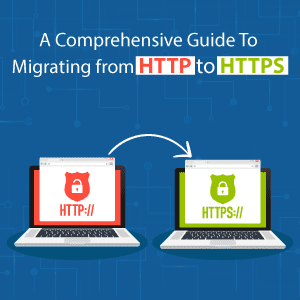
Guide To Migrating from HTTP to HTTPS

The migration from HTTP to HTTPS is essential for the optimal performance of your website. It is also a business owner’s task to provide secure services to their customers, which will help build customer loyalty and trust. Furthermore, it will help reassure the clients that their confidential data is safe with you.

As an organisation, it is your responsibility to offer a high level of security, which comes with an extended SSL certificate validation. A premium SSL certificate is necessary to migrate your website from HTTP to HTTPS.

An HTTPS connection offers a high level of security for the data. It also assigns a higher trust score to your website, which is essential for businesses that rely on their website traffic for lead generation.

Our comprehensive guide provides the framework required to migrate a website from HTTP to HTTPS. We have also offered several resources that should help you install the SSL certificate, the instructions for which may vary from host to host.

Further reading: Website Security – Secure Your Website Against Malware & Spam

Verified 2 Hour(s) Ago
6157 Users Have Claimed This Offer!
Editor's Choice
62% OFF WEB HOSTING PLAN - LIMITED TIME OFFER!
CLICK HERE
Click to Get the Deal
Ending Soon. Hurry!
  • Just click to visit, the offer Applies Automatically.
  • Top Web Hosting Plan for Your Site
  • Free Domain + Free SSL + 62% Off Web Hosting.
  • Upto 75% Off on Shared & WordPress Hosting
read more read less
  • What are the benefits of migrating from HTTP to HTTPS?
  • A. Difference Between HTTP and HTTPS
  • B. Why Should You Migrate From HTTP to HTTPS?
  • C. Is a Dedicated IP Address Required to Redirect HTTP to HTTPS?
  • D. How to Migrate From HTTP to HTTPS?

What are the benefits of migrating from HTTP to HTTPS?

The primary benefit of switching from HTTP to HTTPS is enhanced security. HTTPS helps protect your data from hackers, preventing data theft. It can also help improve your SEO, as Google ranks HTTPS websites higher compared to HTTP sites. The best part, making your website HTTPS compliant is easy, as all you need is an SSL Certificate. SSL Certificates are easily available at a cost-effective price, thanks to Bluehost Coupons. Depending on the level of security you need, you can either choose Domain Validation, Organisation Validation, or Extended Validation SSL Certificate.

Top

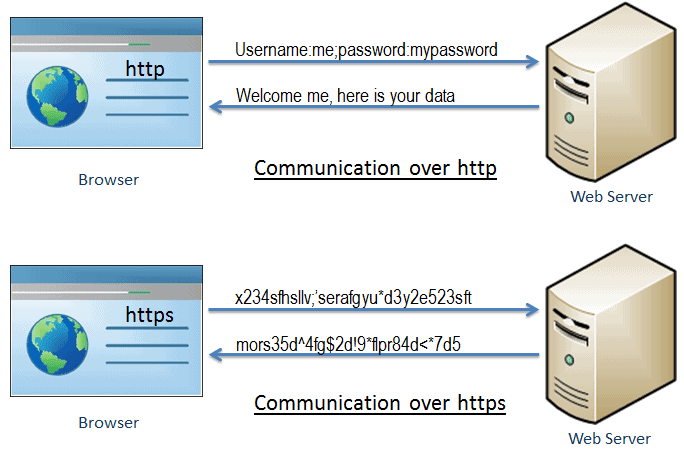
A. Difference Between HTTP and HTTPS

Top

B. Why Should You Migrate From HTTP to HTTPS?

We have already seen a quick overview of why HTTPS is more beneficial than HTTP. So, let’s talk about the primary benefits of HTTPS.

Aquarium and Fish Shop

*Image Credit: Tutorials Teacher

1. HTTPS Provides added Security with SSL/TLS Connection

First and foremost, we’ll talk about the added security feature.

  • Once you migrate from HTTP to HTTPS, your website will send data through an encrypted SSL/TLS connection.
  • In HTTP, data is sent over a connection without encryption. It works fine for regular websites that don’t deal with customer or clients data, but it will not work for websites that handle customer and client confidential data.

For example, suppose you have an eCommerce website, where the users have to enter username and password to their account. eCommerce websites usually ask you to save credit and debit card details for quicker checkouts.

So, if anyone gets their hand on your username and password, they’ll possibly be able to access your card information and can clean out your bank account. So, it won’t do to establish a connection with HTTP for such websites. They require a secure connection, which is possible with HTTPS.

Further reading: Factors to Consider When Choosing An eCommerce Hosting Provider

2. Additional Security Helps Garner Trust and Establishes Credibility

HTTPS is one of the things that you need to configure when you are building your website. For example, website builders such as Google’s Blogger and WordPress recommend HTTPS.

  • What’s more, they internally make use of HTTPS for their websites. The default HTTPS usage statistics show by default HTTPS is used by 78.0% of websites. It sheds light on the importance of having the security provided by HTTPS.
  • Statistics from GS.Statcounter give us an estimate of browser market share worldwide, which is highest for chrome at 63.8%.
  • Another reputed source W3Schools‘ data about browser usage. Around 81% of the visitors to the site used chrome to access it.

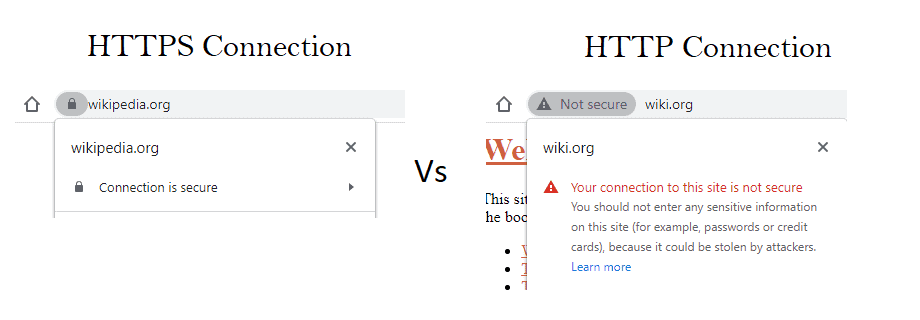
Since most internet users browse from Google Chrome, they can easily distinguish between a secure and unsecured connection. Chrome automatically adds the “Not Secure” text before the URL in Google’s URL box.

HTTPS Connection

Internet-savvy users are instantly put off by a Not Secure (HTTP) connection and leave the website. It creates a bad impression on the users and might increase your website’s bounce rate. None of this is good for your website or business in general. Furthermore, it affects your website’s trust score.

3. It Positively Affects Your Website’s SEO Campaign

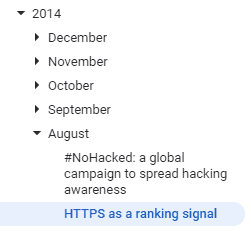
In August 2014, Google declared HTTPS as a ranking signal. The decision was made in a bid to make the internet a secure place for users. At that time, Google took it a step further and started using HTTPS for their applications such as Gmail and Google Drive.

We have already seen data supporting the default usage of HTTPS in the previous point.

HTTPS Ranking Signal

Since its origin, SEO has become a giant organism that keeps growing. Today, ranking for competitive keywords requires not only skills, but also a substantial budget. So, as a website owner who wants to rank on Google, migrating from HTTP to HTTPS will help further your goals in this arena.

4. HTTP/2 Has Improved the Performance of HTTPS

As we have seen, the traditional HTTP protocol had one advantage over the HTTPS protocol -speed. But the launch of feature-rich HTTP/2 in 2015 boosted the performance of HTTPS connections.

In addition, to upgrade the HTTP protocol, we also have the latest version of TLS. The TLS 1.3 offers a boost in the speed of the HTTPS connection. These two working together ensure that websites that choose HTTPS over plain HTTP do not lose anything in the bargain.

Top

C. Is a Dedicated IP Address Required to Redirect HTTP to HTTPS?

The SNI technology, short for Server Name Indication technology, has made it possible to host numerous SSL or TLS certificates on a single shared IP. It ensures that all the latest browsers have upgraded to the extent that they are now compatible with SNI. So, the need for a Dedicated IP address for using an SSL Certificate has been negated.

The biggest issue with using a shared IP Address is dealing with the consequences of sharing it with the wrong person. Someone who uses it for spam or illegal activities could get your IP blacklisted.

How to Get a dedicated IP Address:

  • GoDaddy.com
  • Bluehost.com
  • HostGator
Top

D. How to Migrate From HTTP to HTTPS?

1. Get an SSL Certificate for Your Website

There are three primary types of SSL Certificates, Domain Validation, Organisation Validation, and Extended Validation.

  • Domain Validation offers an SSL certificate for a single domain or sub-domain with simple email validation. It is one of the most affordable certificates issued within minutes.
  • Free Trial and Premium SSL Certificate Vendors

  • Organisation Validation and Extended Validation offer advanced or higher levels of security and trust. These require business verification which can take up to 7 days. Additionally, the extended or organisation validation highlights a company’s name in the address bar.

Where to Get an SSL Certificate?

Always Free

  • SSL For Free
  • Let’s Encrypt with Certbot
  • Cloudfare’s Free SSl for 3 URL

Free Trial and Premium SSL Certificate Vendors

i) With Hosting

Bluehost offers a FREE SSL Certificate with all hosting plan. Additionally, to purchase an SSL certificate for your website, you can make use of Bluehost hosting coupons.

ii) Only SSL Certificates

  • SSL.com’s 90-Day Free trial
  • Instant SSL
  • Comodo.com’s 90 Day Free SSL Certificate
  • GeoTrust
  • GOGetSSL

2. Generate a Certificate Signing Request for your purchased SSL Certificate

Once you have purchased or signed up for a free SSD, you’ll have to generate a certificate signing request. The procedure for doing that differs from host to host. Here are some resources that should assist you in your quest to generate the request.

Resources to Generate Certificate Signing Request

  • LetsEncrypt Certbot Instruction: Select the software and system your website is running on to get requirements.
  • For Comodo: Choose the appropriate CSR generation guide from the knowledge base.

3. Installing the SSL Certificate and Checking the Installation

i) Installing SSL Certificate

Installing SSL Certificate

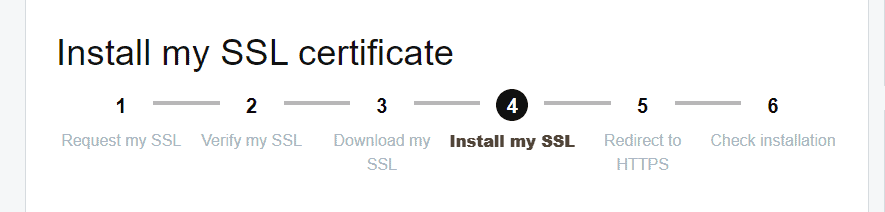
GoDaddy has created a comprehensive step-by-step guide that starts with purchasing the SSL certificate and ends with checking the installation.

Once you have purchased the SSL certificate, you can head over to GoDaddy’s Request my SSL guidelines. The next step is verifying the SSL and then downloading it. Once you reach the installation part, you need to follow the instructions to install them on your server.

Here are some of GoDaddy’s SSL certificate installation instructions for popular servers.

  • cPanel
  • Apache (CentOS)
  • Apache (Ubuntu)
  • Microsoft Exchange Server 2016
  • Microsoft IIS 10
  • Microsoft IIS 8
  • Microsoft IIS 7
  • AWS Server
  • Microsoft Azure Web App

For more instructions on how to install SSL Certificates with GoDaddy, refer to the Installation Guide.

Resources for other Hosting Providers

  • How to activate Free SSL with Bluehost
  • How to Install SSL Certificate with Namecheap
  • How to add SSL with SiteGround
  • How to Install SSL Certificate with HostGator

ii) Redirecting HTTP to HTTPS

Before you check the installation, you need to complete one more step. Redirect your visitors from HTTP to the secure HTTPS version of your site. The documentation for this step will vary based on your hosting provider and SSL certificate provider. For instructions on how to redirect HTTP to HTTPS with GoDaddy, refer to their redirect scenarios.

iii) Checking Installation

Checking the installation is quite simple. Simply go to your browser and try loading your website. In the address bar, you should see a padlock before your URL. It signifies successful installation of the SSL Certificate, and now your website is secure.

Here’s a list of things you check and do if the padlock doesn’t appear

  • Check if you have edited the .htaccess file.
  • Update the robot.txt file that’s still pointing to the HTTP directories.
  • Set up an HSTS (HTTP Strict Transport Security) header to tell web servers to always use the HTTPS version of your site.
  • Fix your websites code by replacing any HTML links from http:// to https://
  • Try resetting the HTTPS redirect settings.
  • You can also try re-keying your certificate to solve the issue.
  • Reinstalling the certificate might help solve the issue.
  • Update the custom scripts, including AJAX and JS, to HTTPS.

18 Low Investment Startup Ideas in India (₹20,000-₹2,00,000)

By Sudhir Bhushan Leave a Comment

Low Investment Startup Ideas

“You have to be burning with an idea, or a problem, or a wrong that you want to right. If you’re not passionate enough from the start, you’ll never stick it out.”― Steve Jobs

We have brought you business ideas that will light the match of innovation. The purpose of this list of start-up ideas is to stimulate your mind into laying the foundation of a successful business. When properly cared for, your idea (a seed) will grow into a fulfilling tree that will benefit the generations to come.

Our comprehensive list includes an extensive ideas, from a simple aquarium shop and homemade candle making to co-working spaces and delivery services. Our list presents you with the average business set-up cost, but you could start with less.

For example, you can assemble an aquarium at your home. Get the aquarium essentials and breed fish, which will increase your supply of fish. It will reduce your set-up cost by a few thousand rupees.

Apart from small business startup ideas in India, we have also shared online business ideas to help you start with minimum investment.

Before you start scouring the list, let us share a few resources. These resources should help you understand the legalities and permits necessary to start a business in India. Apart from this, we have shared dedicated resources with each business start-up idea to ensure that you don’t miss anything.

  • Legal requirements for starting a business in India
  • What business can you start without License and Permit
  • Government Startup Scheme Official Website
  • How to Purchase a Domain Name and Hosting With Bluehost to create a website
Verified 2 Hour(s) Ago
6157 Users Have Claimed This Offer!
Editor's Choice
62% OFF WEB HOSTING PLAN - LIMITED TIME OFFER!
CLICK HERE
Click to Get the Deal
Ending Soon. Hurry!
  • Just click to visit, the offer Applies Automatically.
  • Top Web Hosting Plan for Your Site
  • Free Domain + Free SSL + 62% Off Web Hosting.
  • Upto 75% Off on Shared & WordPress Hosting
read more read less
  • Which are the best offline and online low investment startup ideas in India?
  • A. Small Business Best Start-up Ideas In India
  • 1. Aquarium and Fish Shop
  • 2. Beauty Salon or Barbershop
  • 3. Co-working Space Set-up
  • 4. Home Based Bakery
  • 5. Home-Based Customised Gifts Making
  • 6. Courier/Delivery Start-up
  • 7. Fruit Juice Stall/Kiosk
  • 8. Photography Start-up Services
  • 9. Personal Trainer or Fitness Instructor Services
  • 10. Personal Chef Service
  • 11. Organic Homemade Candle or Soap Brand
  • 12. Fast Food Stall
  • 13. Tutoring Services or Coaching Classes
  • B] Online Business Start-up Ideas in India (0-50,000 Indian Rupees)
  • 14. Writing or Blogging
  • 15. Social Media Consultant Services
  • 16. Website Development
  • 17. YouTube Channel or Brand
  • 18. Graphic Designing Service

Which are the best offline and online low investment startup ideas in India?

When it comes to the best offline start-up ideas, home-based bakery, salon, courier services, and personal trainer tops the list. On the other hand, some of the low-cost online business ideas are content writing, editing, photography, social media and graphic designing. To start any business, online or offline, you require basic knowledge about the particular field. For instance, to become a personal trainer, you would require certifications. The same applies to online start-ups, wherein you can do a course to improve your skill-set.

Top

A. Small Business Best Start-up Ideas In India

1. Aquarium and Fish Shop

Aquarium and Fish Shop

Photo by Bruno Cervera from Pexels

Average business set-up cost: 20,000-1 Lakh Indian rupees

What is included in the investment?

  • Requirements/Supplies: Fish food, tanks with hoods, stands, filtration systems, water treatment systems, heaters, oxygen provider, tank scrubbers, nets etc.
  • Other expenses: Store rent, permit, maintenance, equipment and accessories costs. Staffing, building websites, promoting business etc.

To build a website, you would require a reliable CMS platform and good quality web hosting. Save money on hosting and domain with Bluehost Coupon Codes.

Helpful Resources

  • How To Make Money From a Fish Aquarium Business For Detailed Information.
  • Tips for setting up an low-cost Aquarium
Top

2. Beauty Salon or Barbershop

Beauty Salon or Barbershop

Photo by cottonbro from Pexels

Average business set-up cost: 40,000-1 Lakh Indian rupees

What is included in the investment?

  • Requirements/Supplies: Furniture, mirror, make-up kit, grooming kit, hair straightener, hair trimmer, cloths, towels, etc.
  • Other expenses: Rent, licenses and legal permit costs. Staffing, insurance, electricity, and other utilities.

Helpful Resources

  • High Cost Beauty Salon Business Guide
  • A comprehensive guide to opening a beauty salon
  • How to start a barbershop
Top

3. Co-working Space Set-up

Co-working Space Set-up

Photo by Marc Mueller from Pexels

Average business set-up cost: 1 to 2 Lakh Indian rupees

What is included in the investment?

Requirements: Business permits, furniture, internet connection, charging slots, office supplies, rent, electricity, maintenance charges, coffee machines, lighting fixtures, etc.

Helpful Resources

  • How to Setup A Coworking Space Under the Budget of 5 Lakh INR
  • Everything you need to know about Coworking Spaces
  • Top 60 Startup Cowing Spaces
Top

4. Home Based Bakery

Home Based Bakery

Photo by Daria Shevtsova from Pexels

Average business set-up cost: 45,000 to 60,000 Indian rupees

What is included in the investment?

  • Requirements/Supplies: Baking ingredients, cake tins and trays, oven, mixing bowls, spatula, fridge, working table, etc
  • Other expenses: Cake packaging, website cost, hosting and domain costs (use Bluehost domain coupons and hosting coupons for discounts) promotion, transportation and delivery costs.

Helpful Resources

  • Cost Breakdown for Home Baking Business in India
  • Opening a Commercial Bakery in India
  • How to Start a Home-based Bakery
Top

5. Home-Based Customised Gifts Making

Home-Based Customised Gifts Making

Photo by Kaboompics.com from Pexels

Average business set-up cost: 20,000-1 Lakh Indian rupees

What is included in the Investment?

  • Requirements/Supplies: Equipment such as paper, printers, cloth printing machine, lamination machine, craft equipment, engraving equipment, etc.
  • Other expenses: Gift packaging, website, promotion, transportation and delivery costs.

Helpful Resources

  • Starting a Gift-Shop Business In India
  • How to start a customized Gift Store in India
  • Ideas: The 100 Best Crafts to make Sell
Top

6. Courier/Delivery Start-up

Courier/Delivery Start-up

Photo by Ketut Subiyanto from Pexels

Average business set-up cost: 1 Lakh Indian rupees

What is included in the Investment?

  • Requirements/Supplies: Different types of cartons and boxes, packaging tapes, cargo straps, moving blankets, courier vehicles, mobiles phones equipped with GPS units or Google maps
  • Other expenses: Permits, business insurance for valuable items, accounting, office or warehouse rent, utilities such as electricity bills.

Helpful Resources

  • How to Start a Delivery Business in India
  • Guide to Starting a low-cost Courier Service
  • Business Plan for Indian Courier Startup
Top

7. Fruit Juice Stall/Kiosk

Fruit Juice Stall/Kiosk

Photo by Magda Ehlers from Pexels

Average business set-up cost: 2,000 -1 lakh Indian rupees

What is included in the Investment?

  • Equipment, Furniture, and Supplies: Juice Stall or counter, blender, juicer, ice machine, fruit and vegetable peeler, billing machine, tables, and chairs.
  • Other expenses: Staffing (if necessary), permits, rent, utilities such as electricity bill

Helpful Resources

  • How to Start A fruit Juice Business Under 2000 rupees in India
  • Guide to establishing a Fruit shop in India
  • FAQs to answer your questions regarding Fruit Juice Startup
Top

8. Photography Start-up Services

Photography Start-up Services

Photo by Alexander Dummer from Pexels

Average business set-up cost: 50,000 -1 Lakh Indian rupees

What is included in the Investment?

  • Photography Equipment and Setting: DSLR camera with lenses, external flash, screen and backdrops, studio light system, hardware and fittings
  • Other expenses: Studio permit, studio rent, electricity bills, equipment insurance (if possible or necessary)

Helpful Resources

  • Costs of Starting photography Studio in India
  • Guide to starting a photography business in India
  • How to start a photo studio business in India
Top

9. Personal Trainer or Fitness Instructor Services

Personal Trainer or Fitness Instructor Services

Photo by Bruno Bueno from Pexels

Average business set-up cost: 50,000 – 2 Lakh Indian rupees

What is included in the Investment (In-person and Online)?

  • Person Trainer Equipments: Blood pressure monitor, weight scales, exercise balls, exercise mats, stopwatch, resistance bands, skipping rope, battle ropes, boxing pads and gloves
  • Course and Certifications: ACE Personal Trainer Program, ACE Group Fitness Instructor, ACSM, ISSA

Helpful Resources

  • How to become a Personal Trainer In India: Courses and Certifications
  • Guide to becoming a personal Trainer in India: Everything You Need
  • Personal Trainer Equipment Checklist
Top

10. Personal Chef Service

Personal Chef Service

Photo by Maarten van den Heuvel from Pexels

Average business set-up cost: 1 Lakh – 2 Lakh Indian rupees

What is included in the Investment?

  • Chef Equipment: Chef knives, cooking utensils, pots and pans, can opener, food processor, paper towels, dish towels, washcloths, serving gloves, and first aid kit.
  • Courses: BHM, B.Sc in Hospitality and Hotel management, B.Sc in Catering Science and Hotel management, PG diploma in culinary arts

Helpful Resources

  • How to become a Personal Chef in India: Courses
  • A comprehensive guide for becoming a Chef in india
  • Professional Chef Courses In India
  • Personal Chef Equipment Checklist
Top

11. Organic Homemade Candle or Soap Brand

Organic Homemade Candle or Soap Brand

Average business set-up cost: 25,000 – 2 Lakh Indian rupees

What is included in the investment?

  • Soap Supplies List: Ingredient weighing scale, thermometer, immersion or stick blender, mixing containers for lye and soap, silicone spoons and spatulas, goggles, gloves, soap and moulds.
  • Candle Supplies List: Wax, fragrances, containers, wicks, thermometer, boiler, measurement scale, silicon or wood spoon and spatula, and parchment to protect work surface.

Helpful Resources

  • How to Start a Organic Candle Making Business in India
  • How to Start a Organic Soap Making Business in India
  • Supplies Checklist for making Organic Candles
  • Supplies Checklist for making Organic Soaps
Top

12. Fast Food Stall

Fast Food Stall

Image Reference: Manjit’s Kitchen

Average business set-up cost: 1 Lakh Indian rupees

What is included in the investment?

  • Requirements/Supplies: Kitchen furnishing, burners, small refrigerator, utensils, raw material such as grocery, counter, menu, menu boards, etc
  • Other expenses: Permit, shop rent, water supply, advertising, staffing, etc

Helpful Resources

  • How to start a food cart business in India
  • How to start a small fast food Stall/kiosk business in India
  • Guide to Starting a Fast Food Business in India
Top

13. Tutoring Services or Coaching Classes

Tutoring Services or Coaching Classes

Image Credit: India Today

Average business set-up cost: 1-2 Lakh Indian rupees

What is included in the investment?

  • Requirements/Supplies: Seating arrangement, student lockers (If necessary), lighting, stationery such as books, boards, pencils, projector, and computer systems.
  • Others: Business permit, utilities such as electricity bill, institute rent, staffing, etc

Helpful Resources

  • How to Start a coaching Institute Business in India
  • A complete Guide to Opening a Coaching Institute In India
  • Everything You need to know about starting a Coaching Center
Top

B] Online Business Start-up Ideas in India (0-50,000 Indian Rupees)

Most of you might already own the equipment necessary to start the following online business from home. Listed below are equipment and things you’ll need to start your business.

  • Equipment: Computer or laptop, fast internet connection, smartphone, camera, phone stand for recording, graphic tablets/ Ipad/ Samsung tablets with pen, work planner, etc.
  • Other expenses that might occur: Electricity bill, internet bills, furniture for home office set-up.
Top

14. Writing or Blogging

Writing or Blogging

Average annual earnings: 3.5-4 Lakh Indian rupees

Types of writing business you can start: Article/blog writer, business writer, technical writer, newspaper writer, Ghostwriter, resume writer, subtitle writer, scriptwriter, social media caption writer, novelist, and content strategist

Helpful Resources

  • Backlinko’s Guide To Content Writing
  • Hubspot’s Step by Step Guide To Blogging
  • Creating a content strategy for a website
  • How to Create an Effective Content Strategy for a Website

Writing Courses

  • Script Writing or Screen Writing Courses: Udemy, Coursera, Skillshare
  • Content Courses: Udemy, Coursera, Skillshare
  • Resume Writer: Udemy, Coursera, Skillshare
Top

15. Social Media Consultant Services

Social Media Consultant Services

Photo by Tracy Le Blanc from Pexels

Average annual earnings: 5-6 Lakh Indian rupees

  • Skills Required: Planning strategy, building an engaging community, content creation and timely posting, analysing results, social media advertising, and social media tool knowledge.

Helpful Resources

  • How to become a successful social Media Consultant
  • Role of a Social Media Consultant
  • 25 Top Social Media Management tools
Top

16. Website Development

Website Development

Average annual earnings: 3 Lakh Indian rupees

Helpful Resources

  • How to become a Web Developer
  • Web Development Skills to Have
  • A beginners Guide To Web Development

Web Development Courses

  • The Complete Web Developer Course 2.0
  • Skill Share Web Development Courses
  • Coursera Web Development Courses
Top

17. YouTube Channel or Brand

YouTube Channel or Brand

Average annual earnings: 200-6 Lakh Indian rupees

Required Skills: Knowledge about the YouTube platform, social media presence, content research, video editing, and building digital awareness

Helpful Resources

  • How to become a Successful Youtuber in India
  • A Beginner’s guide to achieving success through YouTube
  • 30 YouTube Channel Ideas For you to Get Started
Top

18. Graphic Designing Service

Graphic Designing Service

Photo by Polina Zimmerman from Pexels

Average annual earnings: 3 Lakh Indian rupees

Required Skills: Photoshop, Illustrator, Indesign, HTML, UI/UX designing, print design, typography, CSS, Microsoft Office, photography, digital marketing, and branding

Helpful Resources

  • Graphic Designer Career Guide
  • How to become a graphic Designer in India
  • 12 Graphic Design Skill You need to Survive as Graphic Designer

Courses

  • Udemy Graphic Design Courses
  • Graphic Design Specialization with Coursera
  • Skill Share Graphic Design Courses

7 Tips to Speed Up Your WordPress Website in 2023

By Sudhir Bhushan Leave a Comment

Tips to Speed Up Your WordPress Website Faster loading pages can get you higher traction online and improve your chances of ranking on SERP. Today, businesses of all sizes and domains choose WordPress for web hosting. It is the most popular CMS platform that lets you integrate with different plugins and tools to create a dynamic website.
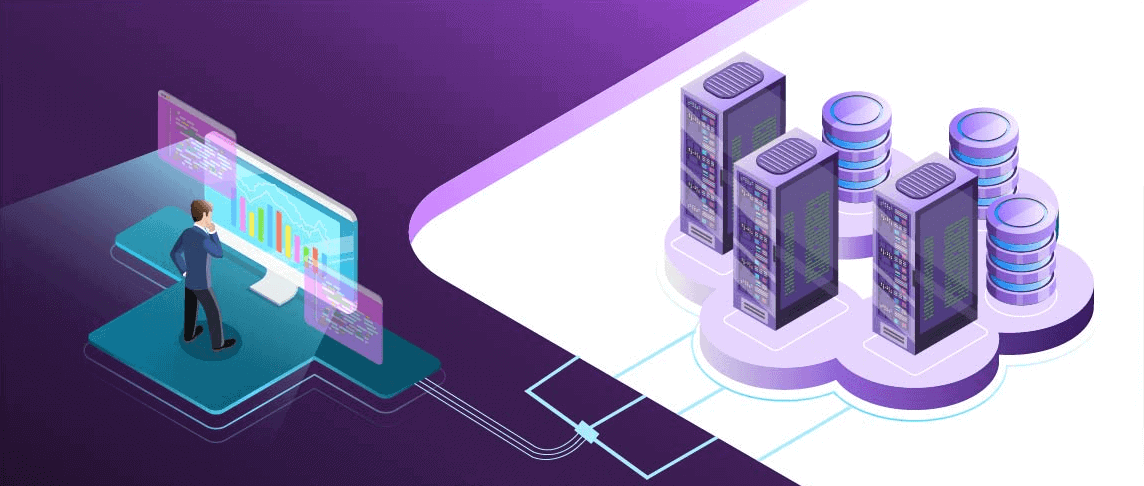
But, a great-looking website won’t yield any results if the site does not load in three seconds. Faster loading pages improve the user experience and optimise the performance of your WordPress website. Below are a few tips that can help you speed up your WordPress website.

Read: 9 Important SEO Metrics to Track (How to Improve Them)

Verified 2 Hour(s) Ago
6157 Users Have Claimed This Offer!
Editor's Choice
62% OFF WEB HOSTING PLAN - LIMITED TIME OFFER!
CLICK HERE
Click to Get the Deal
Ending Soon. Hurry!
  • Just click to visit, the offer Applies Automatically.
  • Top Web Hosting Plan for Your Site
  • Free Domain + Free SSL + 62% Off Web Hosting.
  • Upto 75% Off on Shared & WordPress Hosting
read more read less
  • How To Speed up a WordPress Website?
  • A. Why is Speed so Important?
  • B. Tips to Speed Up Your WordPress Website
  • Speed up your site

How To Speed up a WordPress Website?

Website speed is a vital ranking factor as it helps improve the experience of users while browsing through a website. There are many ways to optimise your site for speed. Some of them include using the best web hosting provider, optimising images & videos before uploading them on your website, and deleting or uninstalling unnecessary WordPress plugins. Apart from these, a CDN Network can help improve website speed. Plus, make sure to pick a lightweight theme for your website to avoid speed issues.

Top

A. Why is Speed so Important?

Nothing frustrates a visitor more than a slow website. It creates a bad user experience, leading to a high bounce rate. And in the worst scenario, the users may not return to your website because of slow loading.

1. According to a study, most people prefer a faster loading time compared to fancy site animations.

2. According to Google – as the page load size goes from 1 to three seconds – the user bouncing rate increases by 32%.

3. Google uses core web vitals to understand why the users leave your website. There are three vital metrics – First input delay, Largest contentful paint, and Cumulative layout shift.

  • The range of the First input delay should be 0 to 100ms
  • The range of the Largest contentful paint should be 0 to 2 seconds
  • The range of Cumulative layout shift should be 0 to 0.1
Top

B. Tips to Speed Up Your WordPress Website

1. Look for a Different Host

Look for a Different Host

The hosting provider you choose will have an impact on your website speed. If you are on a budget plan, your website won’t be able to accommodate the resources (images, video files, etc) – and that will affect the speed. Moreover, with a traffic surge, your website will suffer. Following this, it is essential to understand your WordPress hosting plan features.

Read this Bluehost review to understand the WordPress hosting plans offered by Bluehost.

  • Based on your need, you need to choose a hosting plan that helps improve your site’s functionality. You also need to ensure your web hosting provider offers the best customer and technical support.
  • Irrespective of a blog or a website, choose a hosting provider that offers seamless scaling.
  • Select a web hosting provider that offers added tools and plugins that enables efficiency and speed.
  • Some website providers also offer website migration options for improving website speed.

Make use of Bluehost coupons to buy web hosting for your website now!

2. Optimise Images and Videos

Optimise Images and Videos

If your page size is heavy, you’ll need more resources to scale. Images, videos, and media files take up a lot of space. You will need to compress the media files to ensure your site is loading faster.

  • Images take an average of 34% of the total website resources, so it is vital to optimise images using different compression tools. Besides, a good image optimisation workflow is the easiest to implement.
  • You can use Optimole and WP Smush plugin for image optimisation.
  • Moreover, you can compress media files to decrease the page size or use lazy load, which is a popular option.

3. Discard plugins – Not in Use

When you create a WordPress website, you install many plugins and tools to enhance the site’s functionality and performance. But as your site grows, the requirement also changes. Unnecessary plugins and tools bloat your database, thereby affecting the website’s speed and traffic.

  • You will need to disable or delete all plugins that aren’t in use.
  • Check in the dashboard area and see your list of plugins. Uninstall the ones you don’t use. Most plugins serve no real purpose on your site and only affect the site speed.
  • It is best to evaluate the plugins you don’t require and make a list of relevant ones. This step plays an important role in improving website speed and performance.

4. Use a Lightweight WordPress framework

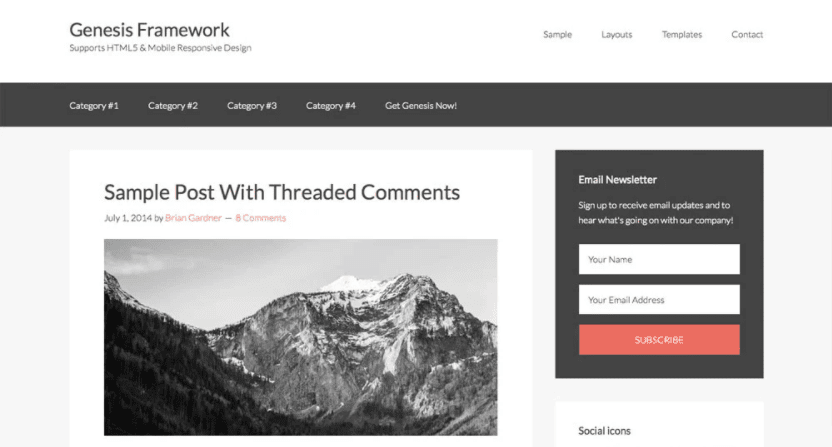
Lightweight WordPress framework

There is no dearth of WordPress themes. But, some themes, like dynamic WordPress themes, may affect site speed as they are loaded with dynamic elements, social icons, and widgets.

Dynamic elements may be visually appealing, but they are not good when it comes to the site’s functionality. Besides, if there are too many elements on a website, it will cause the server to crash.

  • The best thing you can do is use a lightweight theme with minimum plugins.
  • You can choose default WordPress themes that offer minimum plugins but are good for a new site set-up.
  • Additionally, with a feature-rich website, having a good framework is essential. If the WordPress website is not updated regularly, it may cause lags and issues.
  • Try keeping the auto-update feature on to prevent any site-related issues.

5. Minify JS and CSS files

It is essential to minify the CSS and JS files to improve website speed. Google’s PageSpeed Insights tool notifies you about the minification of these two files. By minifying JS and CSS, you can reduce the number of codes that are transferred to the server.

The added characters are eliminated during the process, which helps in better site readability. Besides, reduced page load time provides a better user experience.

  • You can use different plugins to minify the JS and CSS files.
  • AutoOptimise is a popular plugin for minification. The plugin helps optimise the javascript files and CSS and ensures your website loads faster. In addition, you can also minify the HTML of your website.

6. Disable Pingbacks and Trackbacks

Most people aren’t aware of pingbacks and trackbacks. The two components alert you when your page or blog receives a link.

  • If you keep pingbacks and trackbacks on your website, it will put added strain on the server resources, which may cause slow loading.
  • When someone requests a site link, it generates added request from WordPress that works on and off. This functionality can impact your site while targeting DDOS attacks.

You can disable pingbacks and trackbacks on the WP-admin page.

  • Go to your wp-admin page, discussions, and settings.
  • You need to disable ‘allow link notifications from other sites.’

7. Use a CDN Network

CDN Network

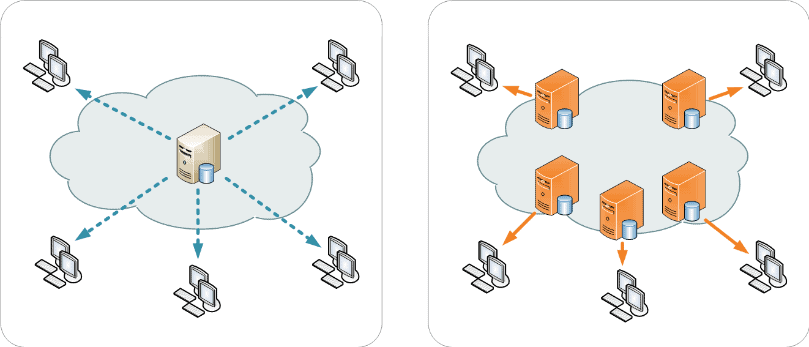
The location of your web hosting server impacts your website speed. A CDN network helps speed up a WordPress website for all visitors. As the network comprises many servers around the globe, each server stores static files that make a website. The static files include CSS and JavaScript.

  • With a CDN, a user is served a static file from the server closest to the website. Following this, your server will work faster, and the site will load faster.
  • Apart from the CDN network, you can use plugins that offer speed and a better user experience. Always check for plugins before installation on your website.

Also read: How To Setup Free Cloudflare CDN For Your WordPress?

Top

Speed up your site

Speed up your site

The need for speed has become a primary requirement of a website. Visitors prefer websites that offer an enhanced user experience and faster loading time.

By optimising your website using the above tips, you can considerably improve your site’s speed.

There are also many tools to check website speed, so use them to identify errors and rectify them. Plus, invest in reliable hosting to optimise your site’s load time and performance. Use Bluehost hosting coupons to buy hosting at a discount.

  • « Previous Page
  • 1
  • 2
  • 3
  • 4
  • 5
  • …
  • 10
  • Next Page »

DMCA
PROTECTED


Back to Top

© Copyright 2026 BHICoupons.in · All Rights Reserved · All Logos & Trademark Belongs To Their Respective Owners·

Bluehost Coupon
Editor's Choice
CLICK HERE
Click to Get the Deal
Ending Soon. Hurry!
  • Just click to visit, the offer Applies Automatically.
  • Top Web Hosting Plan for Your Site
  • Free Domain + Free SSL + 62% Off Web Hosting.
  • Upto 75% Off on Shared & WordPress Hosting
read more read less